Cloud & WhatsApp QMS

All Features & Capabilities

Everything included in your Cloud QMS and WhatsApp QMS subscription — from queue control to appointment booking, multi-branch management, smart analytics, and customer self-service. All features included, no per-feature add-on fees.

Cloud QMS WhatsApp QMS All features included Always improving
See It In Action

Real Screenshots From the System

Every screen your staff and customers will actually use — from the live dashboard to queue control, KPI reports, and the customer's own phone.
Dashboard
Queue Control
KPI Report
Queue Calendar
Customer List
Customer Status
Self-Cancel
Branch Dashboard
Branch Compare
Branch Performance
Queue Report
Request History
Queue Number Report
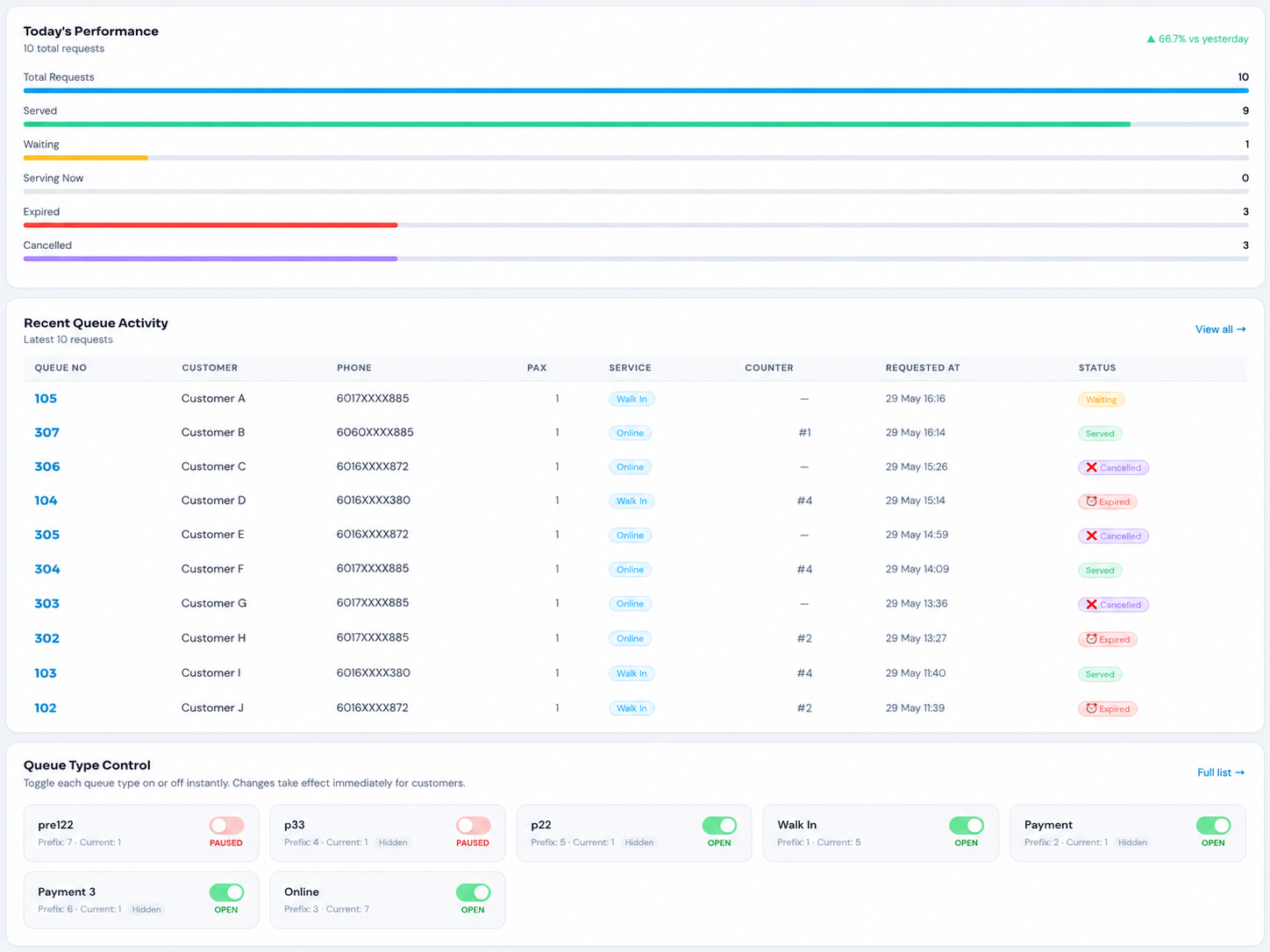
Cloud QMS admin dashboard showing today's performance — total requests, served, waiting, expired, cancelled, recent queue activity, and queue type controls

📊 Real-Time Admin Dashboard

The home screen for managers — live performance metrics, recent queue activity, and instant queue type controls, all updating automatically throughout the day.

  • Today's Performance barsTotal requests, served, waiting, serving now, expired, cancelled — with % comparison vs yesterday
  • Recent queue activityLatest 10 requests with customer, phone, pax, service, counter, time, and colour-coded status
  • Queue Type Control togglesTurn each queue type ON/OFF instantly — changes take effect immediately for customers
  • Live status badgesWaiting, Served, Cancelled, Expired all clearly colour-coded for instant scanning
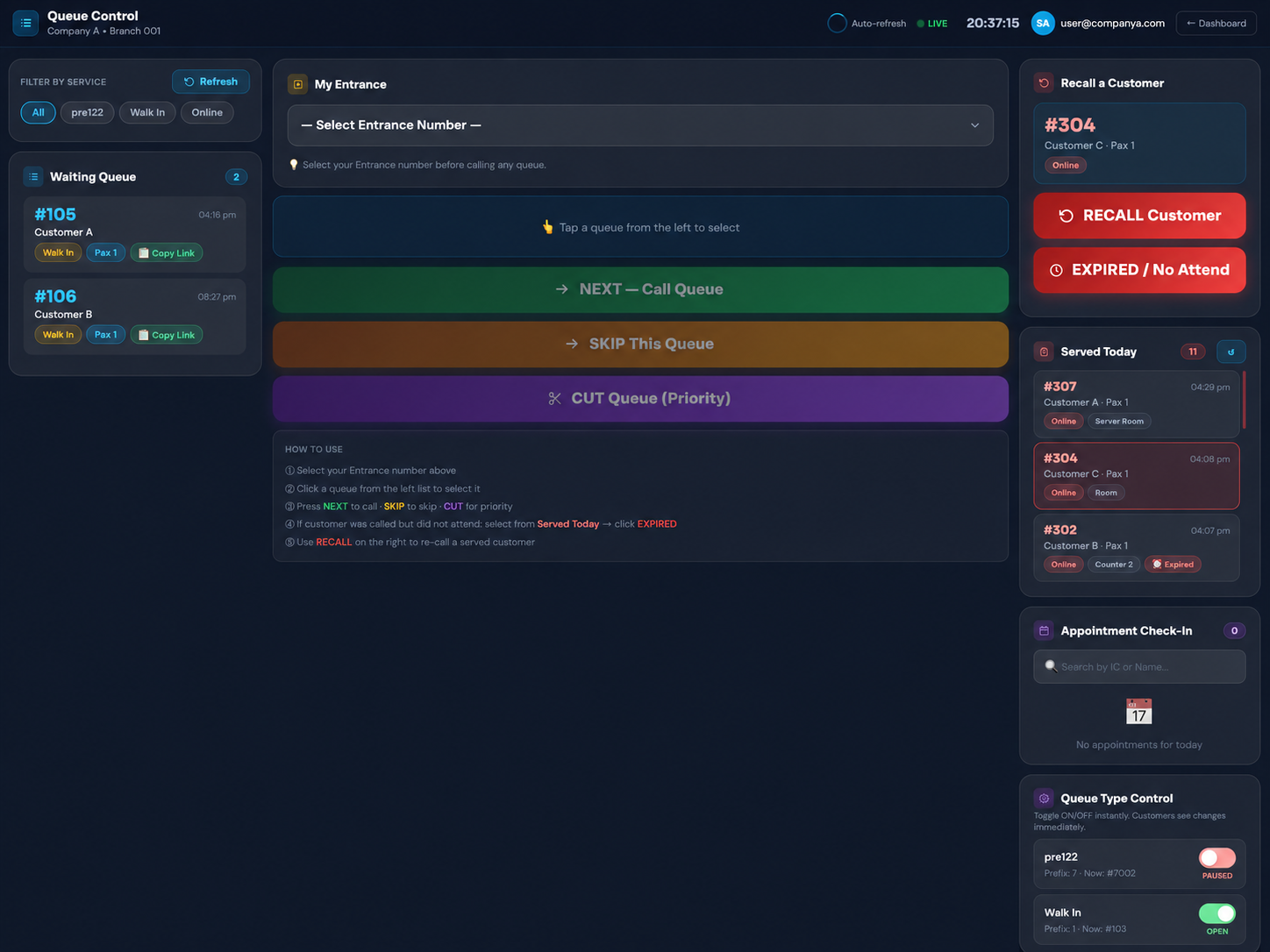
Cloud QMS staff queue control panel with Next, Skip, Cut Queue buttons, waiting queue list, recall customer, expired no-attend, served today, and appointment check-in panel

🖥️ Staff Queue Control Panel

The main screen staff use to run the queue. Call, skip, prioritise, recall, and mark no-shows — all from one live screen that auto-refreshes.

  • NEXT / SKIP / CUT QueueLarge one-click buttons to call the next customer, skip absent ones, or prioritise urgent cases
  • Waiting Queue listLive list with queue number, customer, service badge, pax, and copy-link button
  • Recall & Expired / No AttendRe-call a served customer, or mark a called-but-absent customer as expired with a remark
  • Served Today & Appointment Check-InSee today's served list and check in appointment customers by IC or name
  • Queue Type ControlPause or open each queue type live — customers see changes instantly
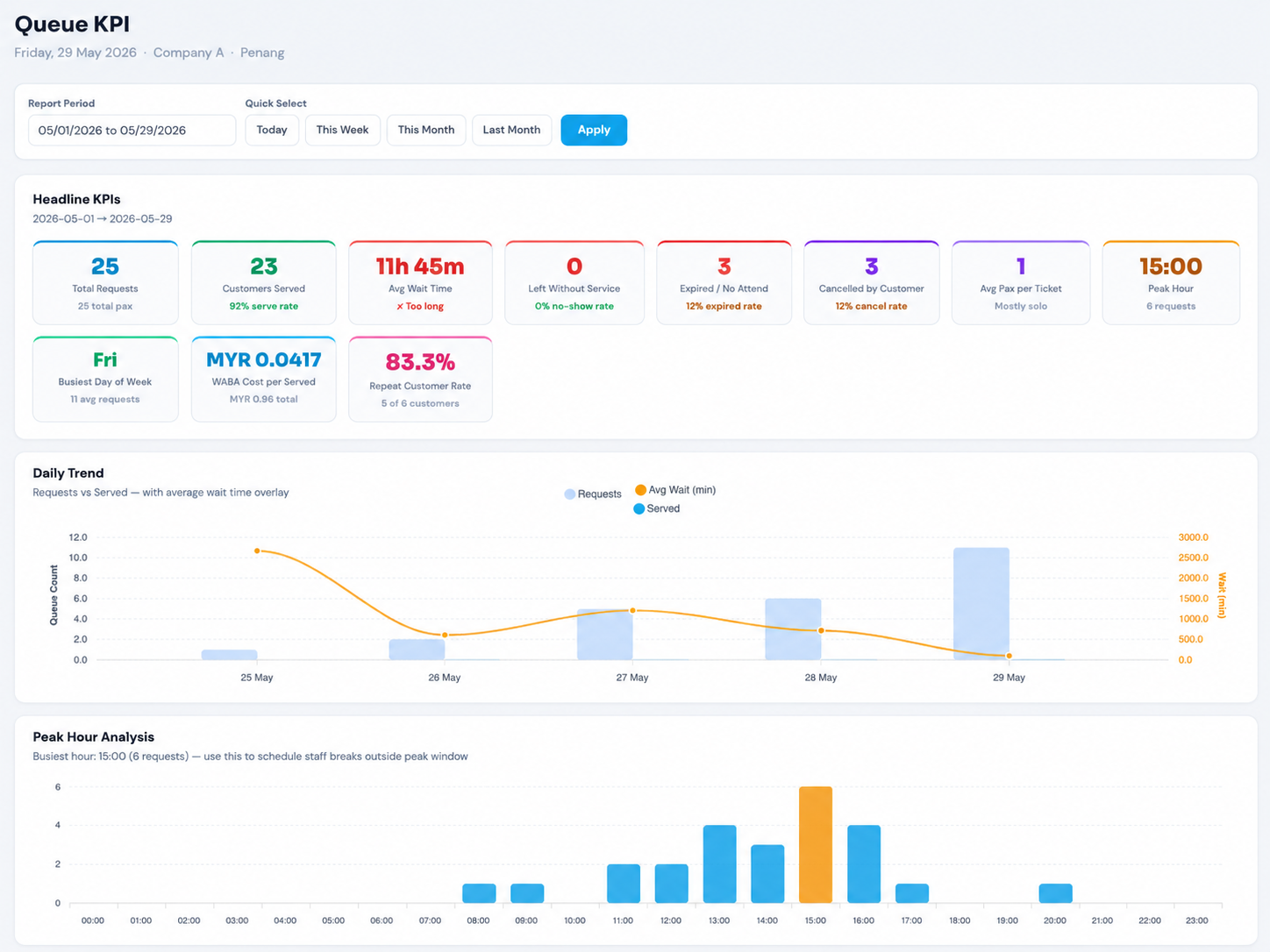
Cloud QMS Queue KPI report with headline KPIs — total requests, serve rate, average wait time, no-show rate, expired rate, cancel rate, peak hour, repeat customer rate, daily trend chart, and peak hour analysis

📈 Queue KPI Report

Management-grade analytics for any date range. Understand serve rates, wait times, peak hours, no-show patterns, and customer loyalty at a glance.

  • 11 headline KPIsTotal requests, serve rate, avg wait, no-show rate, expired rate, cancel rate, avg pax, peak hour, busiest day, cost per served, repeat rate
  • Daily Trend chartRequests vs served with average wait time overlay — spot trends over the period
  • Peak Hour AnalysisHour-by-hour bar chart highlighting your busiest hour — schedule staff breaks outside peak
  • Quick date filtersToday, This Week, This Month, Last Month, or any custom date range
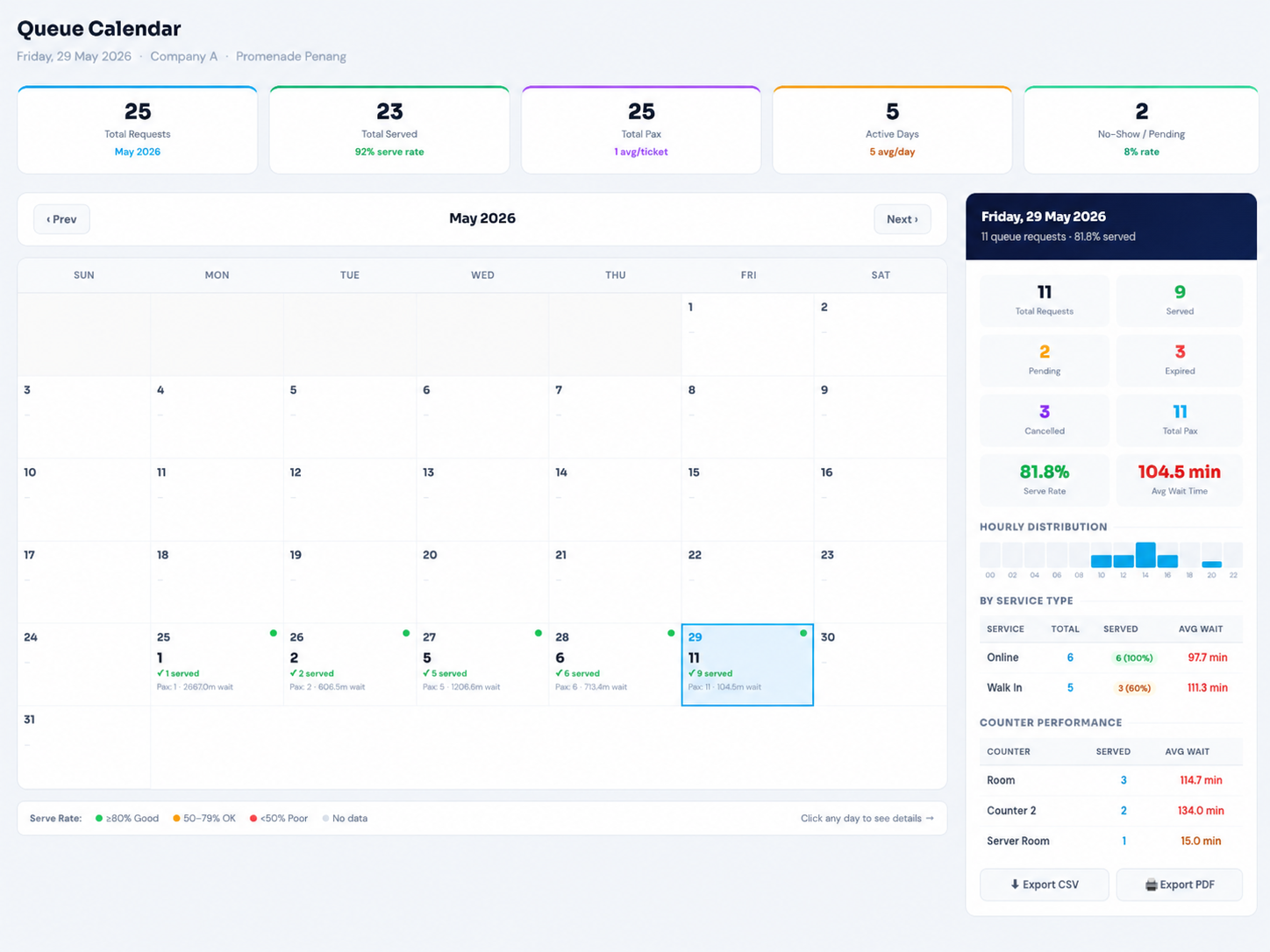
Cloud QMS Queue Calendar — monthly view with daily serve rate colour dots, summary tiles, and per-day breakdown showing requests, served, pending, expired, cancelled, hourly distribution, service type and counter performance

📅 Queue Calendar

A monthly overview of your entire queue operation. Click any day to drill into a complete breakdown of that day's performance.

  • Colour-coded serve rate dotsGreen (≥80% good), amber (50–79% OK), red (<50% poor) on every active day
  • Day detail panelRequests, served, pending, expired, cancelled, pax, serve rate, and avg wait for the selected day
  • Hourly distributionMini bar chart showing busy hours within the selected day
  • By service type & counterPer-service and per-counter served counts and average wait times
  • Export CSV & PDFDownload the day's full data for records or reporting
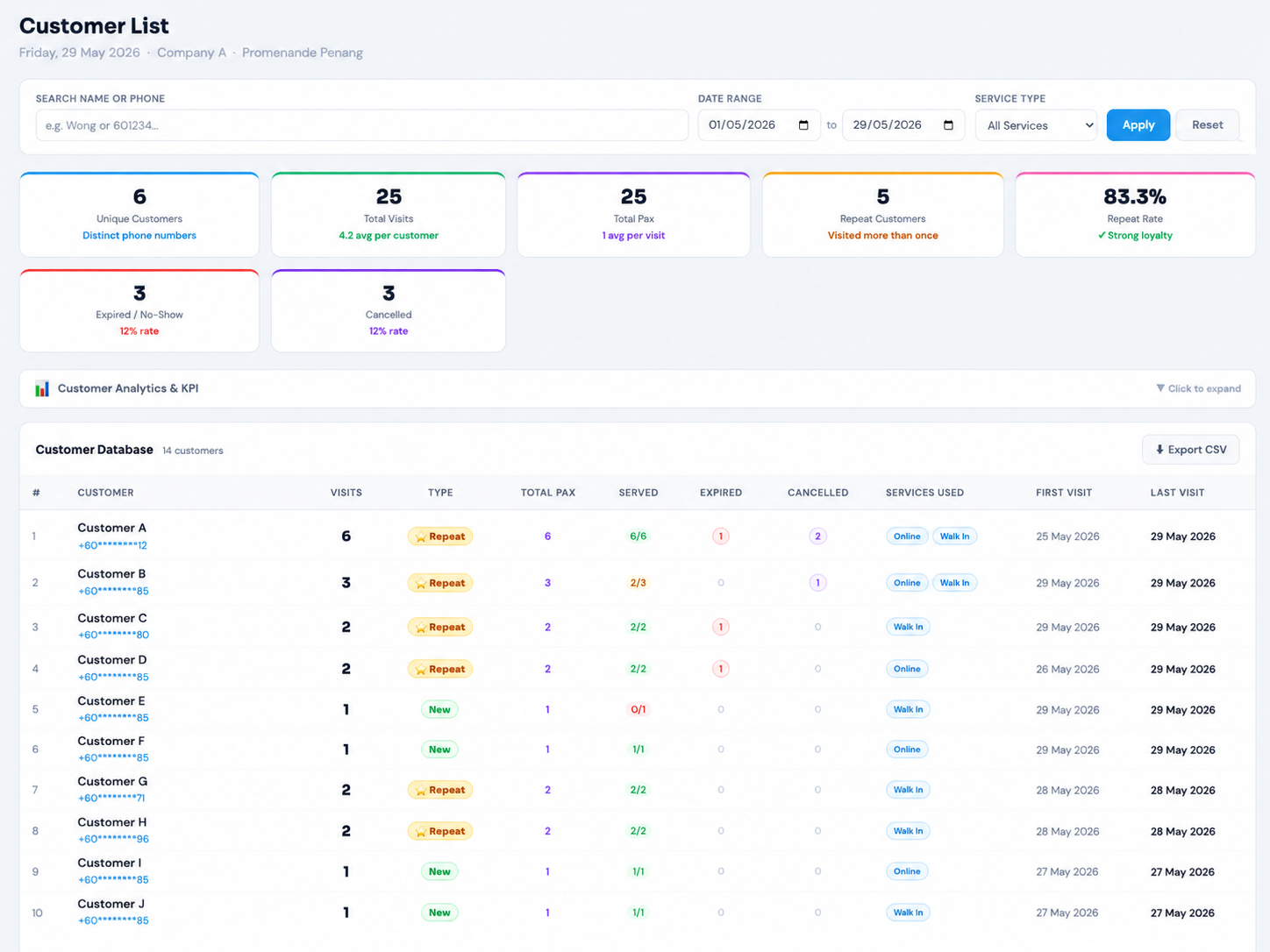
Cloud QMS Customer List — unique customers, total visits, repeat rate, expired and cancelled rates, and a customer database table showing visits, new vs repeat type, pax, served ratio, services used, first and last visit

👥 Customer Database & List

An automatic customer database built from every queue entry. Track loyalty, visit history, and behaviour without any manual data entry.

  • Loyalty KPIsUnique customers, total visits, repeat customers, repeat rate, expired and cancelled rates
  • New vs Repeat taggingEach customer auto-tagged as New or Repeat based on visit history
  • Per-customer detailVisit count, total pax, served ratio, expired, cancelled, services used, first and last visit dates
  • Search & filterSearch by name or phone, filter by date range and service type
  • CSV exportDownload the full customer database for CRM, marketing, or records
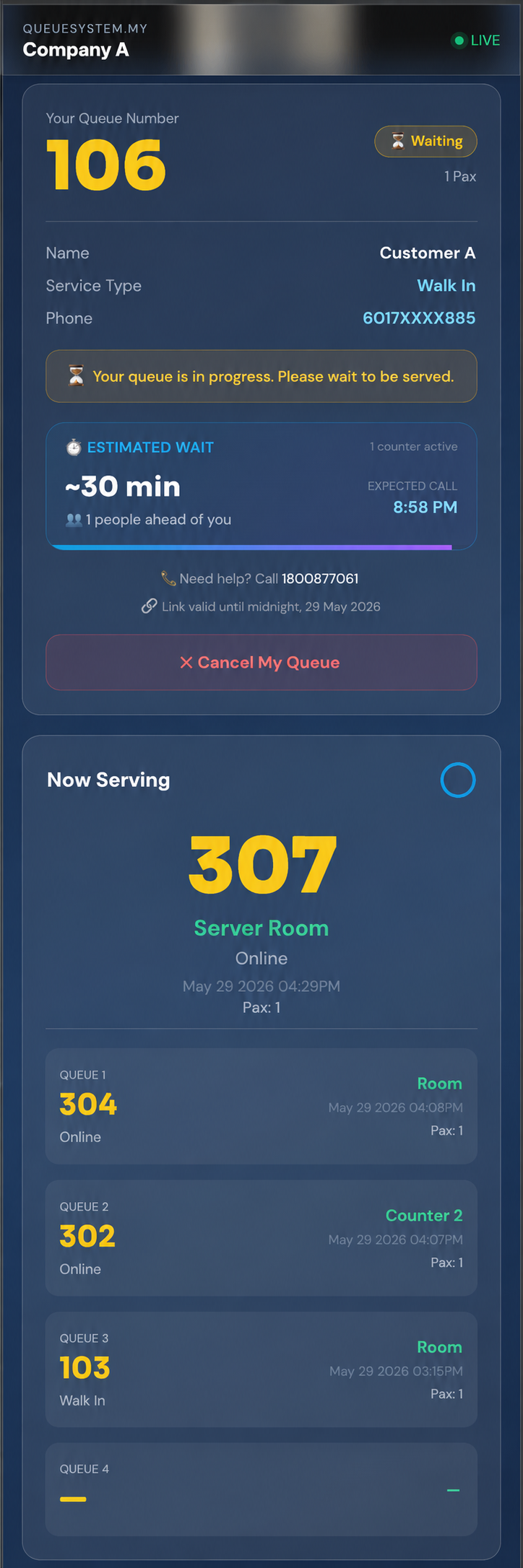
Cloud QMS customer queue status page on mobile showing queue number 106, waiting status, estimated wait time of 30 minutes, people ahead, expected call time, cancel my queue button, and now serving list

📱 Customer Queue Status Page

What the customer sees on their own phone after taking a queue number — live position, smart wait estimate, and the option to cancel if plans change.

  • Big queue number & statusTheir number, pax, and live Waiting / Serving status badge
  • Smart estimated wait"~30 min", people ahead count, expected call time, and active counters — updates every 4 seconds
  • Now Serving listLive view of which numbers are being served at each counter
  • Help & link validityContact number plus a note that the link is valid until midnight
  • Cancel My Queue buttonCustomer can cancel their own queue any time while waiting
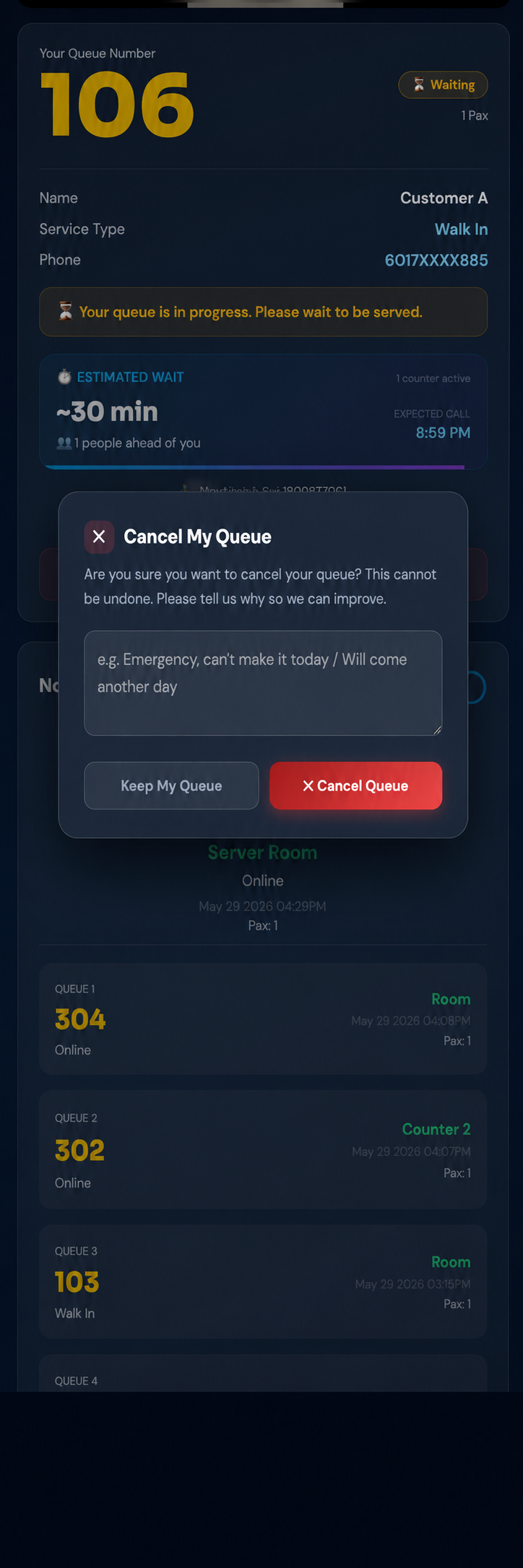
Cloud QMS Cancel My Queue confirmation dialog asking the customer to confirm cancellation and enter a reason, with Keep My Queue and Cancel Queue buttons

❌ Customer Self-Cancellation

When a customer can't make it, they cancel from their phone instead of leaving silently. The reason they give helps you understand and improve service.

  • Confirmation dialogClear "Are you sure?" step prevents accidental cancellations
  • Required reasonCustomer must tell you why — e.g. "Emergency, can't make it today"
  • Keep or CancelTwo clear options — Keep My Queue or confirm Cancel Queue
  • Instant queue updateCancelled ticket disappears from staff's waiting queue within 3 seconds
  • Tracked everywhereCancellation reason and timestamp appear in dashboard, reports, and customer list
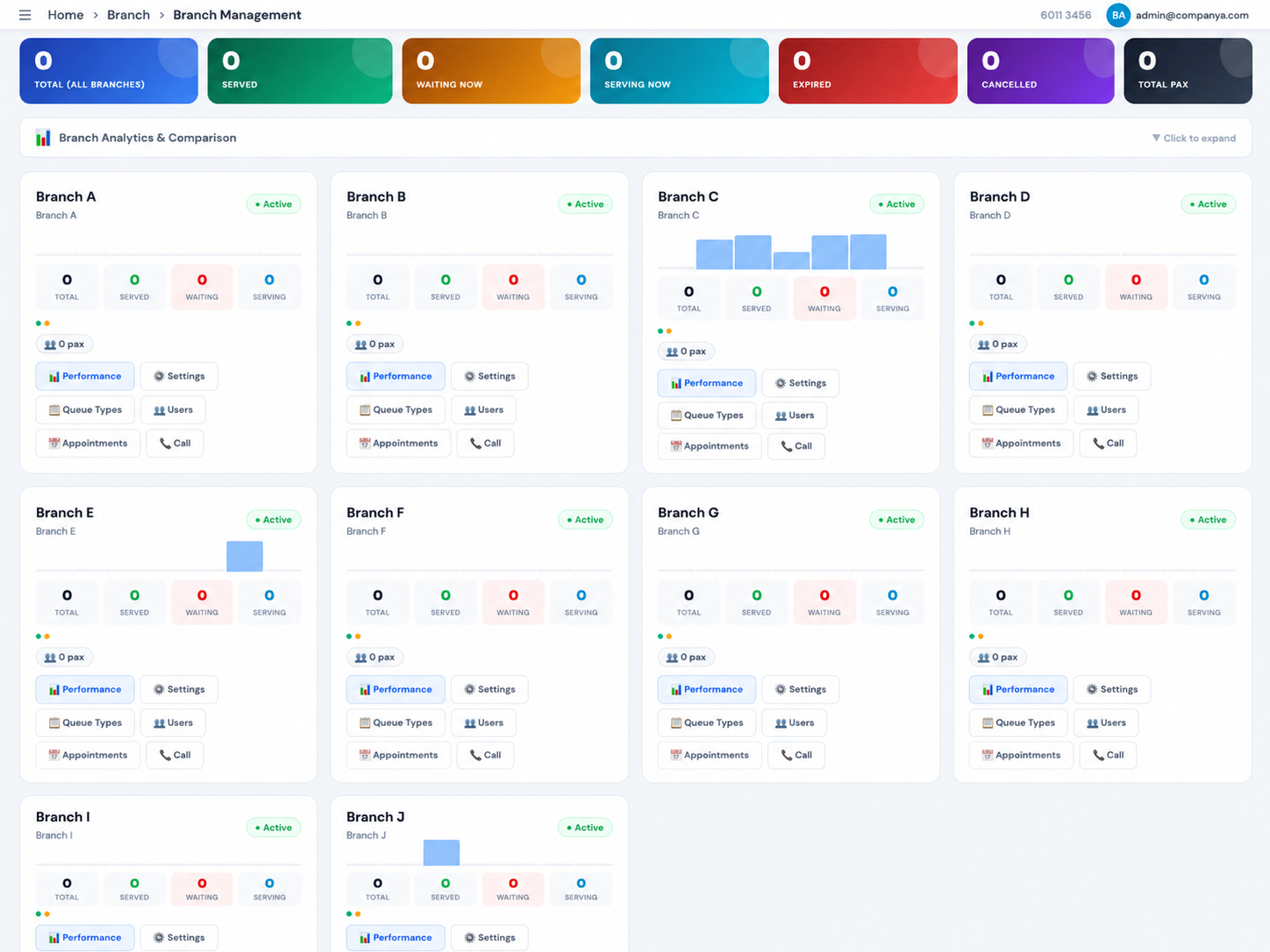
Cloud QMS multi-branch management dashboard showing all branches with live total, served, waiting, serving, expired, cancelled, total pax stats, mini activity charts, and quick action buttons for performance, settings, queue types, users, appointments, and call per branch

🏢 Multi-Branch Management Dashboard

The HQ control center. See every branch's live performance at a glance and jump straight into managing any location — without logging into each branch separately.

  • Company-wide totalsCombined total, served, waiting now, serving now, expired, cancelled, and total pax across all branches
  • Per-branch cardsEach branch shows its own live stats, activity chart, and active status indicator
  • Quick action buttonsPerformance, Settings, Queue Types, Users, Appointments, and Call — per branch, one click away
  • Branch Analytics & ComparisonExpandable comparison panel built right into the dashboard
  • Auto-refreshLive stats update automatically so HQ always sees the current picture
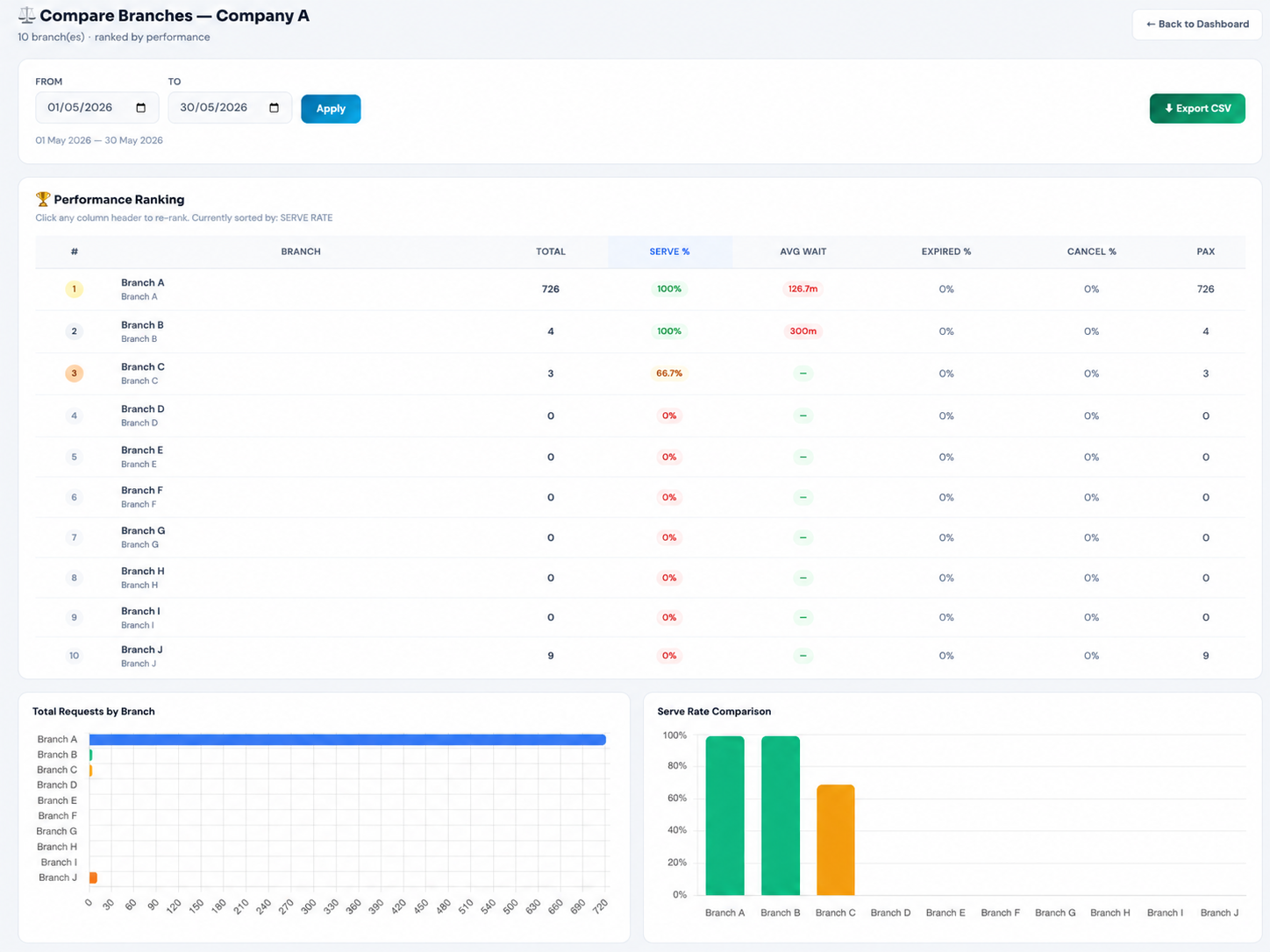
Cloud QMS Compare Branches performance ranking table ranking all branches by serve rate, total requests, average wait time, expired rate, cancel rate and pax, with total requests by branch bar chart and serve rate comparison chart

🏆 Compare Branches — Performance Ranking

Rank every branch side by side on the metrics that matter. Spot your top performers and the branches that need attention in seconds.

  • Ranking tableAll branches ranked by total, serve %, avg wait, expired %, cancel %, and pax — #1 highlighted with a gold badge
  • Click any column to re-rankSort instantly by any metric to find best or worst performers
  • Total Requests by Branch chartHorizontal bar chart comparing customer volume across locations
  • Serve Rate Comparison chartColour-coded bars benchmarking service quality per branch
  • Date range & CSV exportCompare any period and download the full ranking as CSV
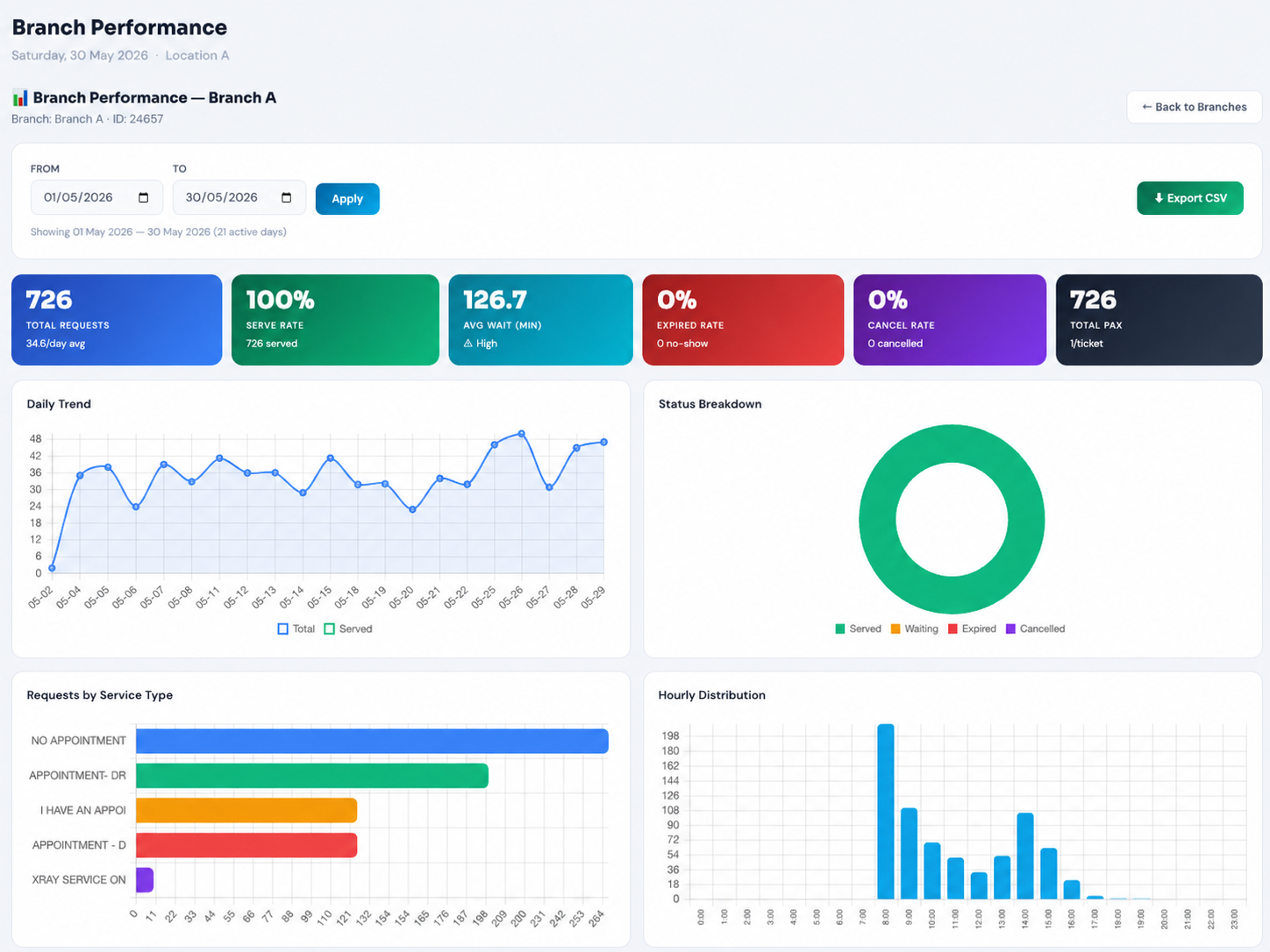
Cloud QMS single branch performance report with KPI cards for total requests, serve rate, average wait, expired rate, cancel rate and total pax, plus daily trend line chart, status breakdown donut, requests by service type bar chart, and hourly distribution

📊 Single Branch Performance Report

Drill into any one branch for a full performance breakdown over any date range — trends, status mix, service demand, and busiest hours.

  • Branch KPI cardsTotal requests, serve rate, avg wait, expired rate, cancel rate, total pax — with daily averages
  • Daily Trend chartTotal vs served line chart across the selected period
  • Status Breakdown donutServed / waiting / expired / cancelled split at a glance
  • Requests by Service TypeSee which services drive the most demand at that branch
  • Hourly DistributionIdentify the branch's busiest hours for staffing decisions
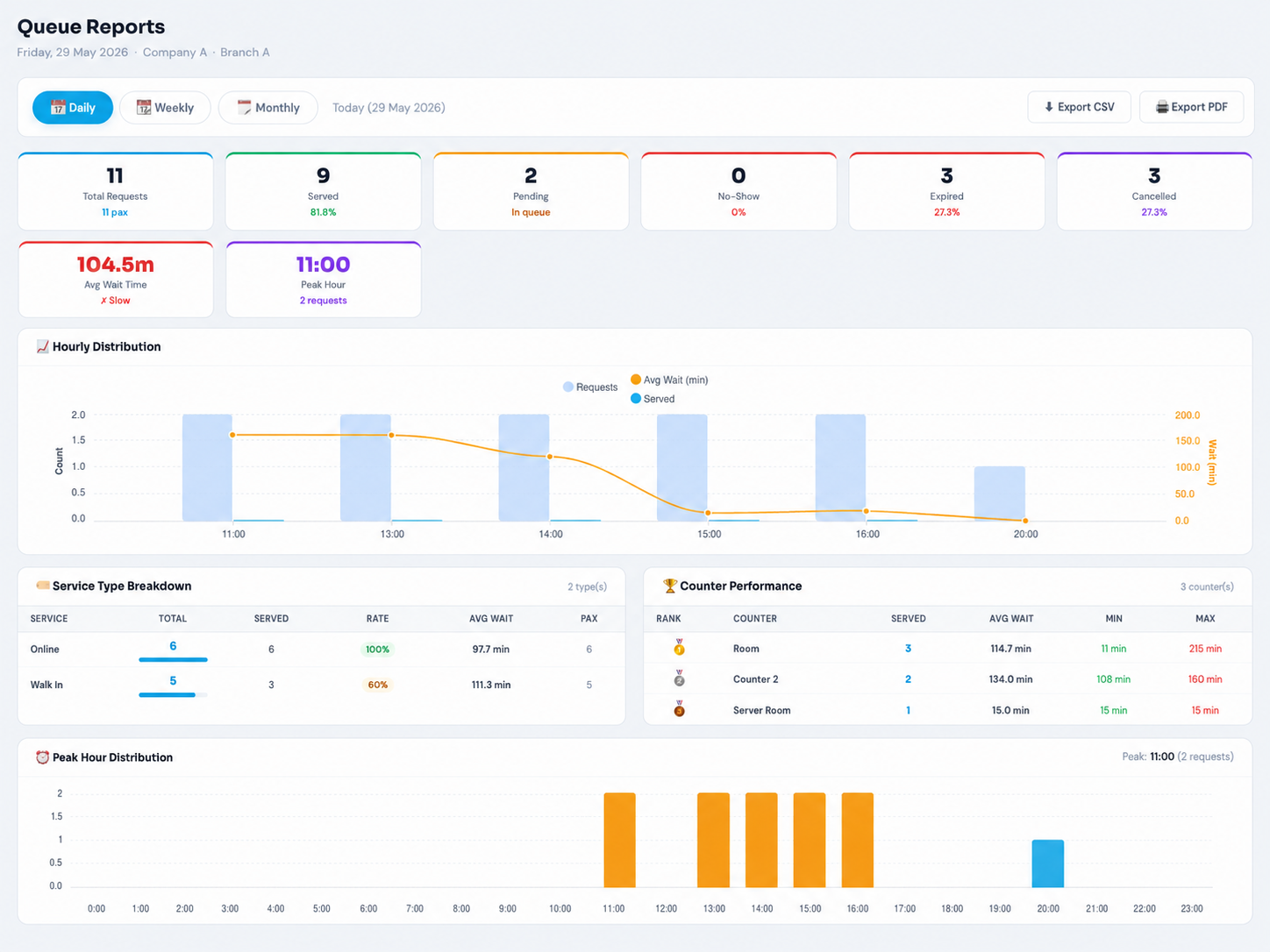
Cloud QMS Queue Reports page with daily weekly monthly toggle, KPI cards for total requests, served, pending, no-show, expired, cancelled, average wait time and peak hour, hourly distribution chart, service type breakdown, counter performance ranking, and peak hour distribution

📄 Queue Reports (Daily / Weekly / Monthly)

Comprehensive operational reports with daily, weekly, and monthly views. Everything a manager needs to understand performance and plan ahead.

  • Daily / Weekly / Monthly toggleSwitch report period in one click
  • Full KPI cardsTotal, served, pending, no-show, expired, cancelled, avg wait, and peak hour
  • Service Type BreakdownTotal, served, serve rate, avg wait, and pax per service type
  • Counter Performance rankingRanked counters with served count and min/max/avg wait times
  • Export CSV & PDFDownload reports for records or sharing
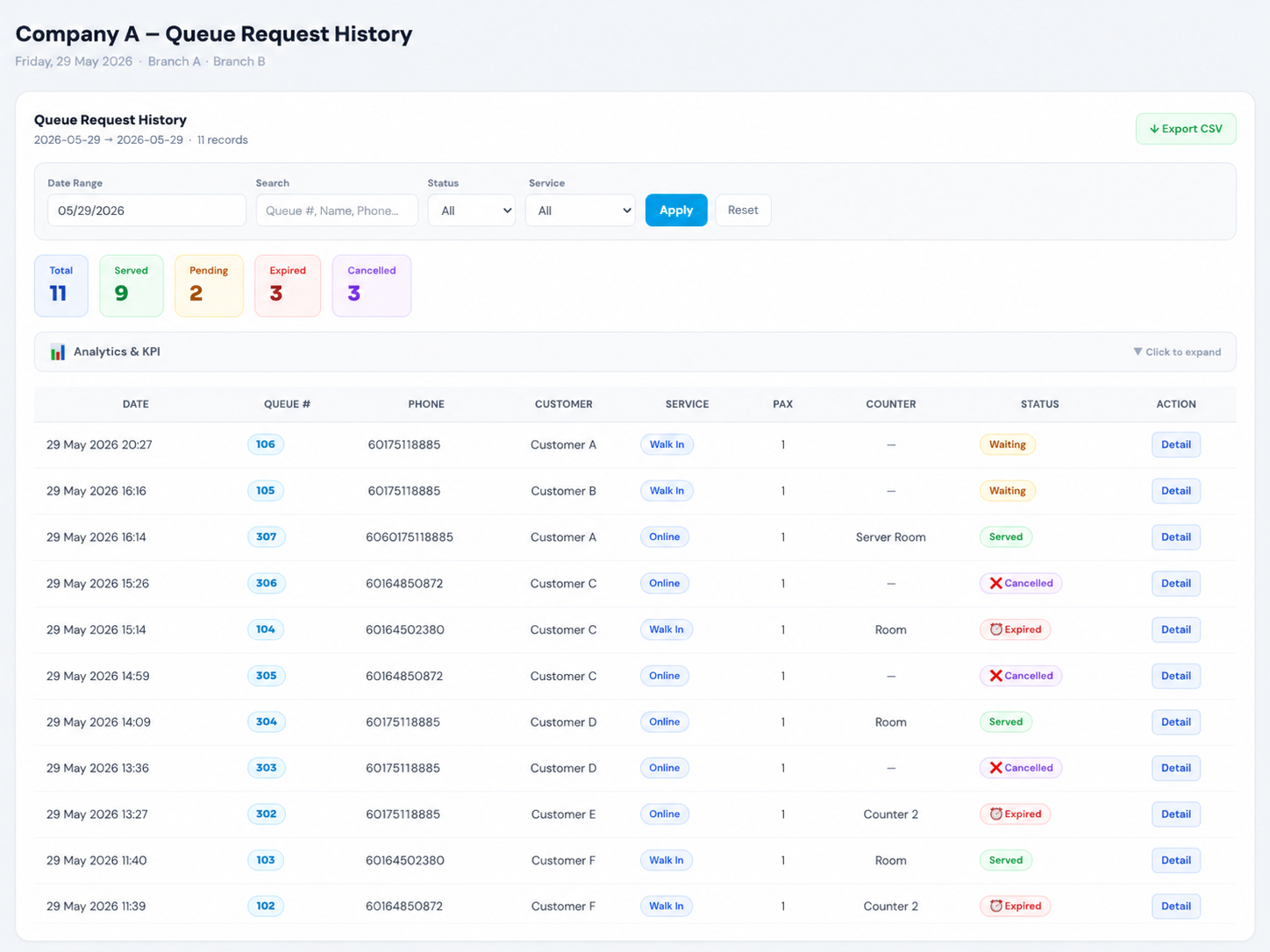
Cloud QMS Queue Request History page with date range search status and service filters, summary tiles for total served pending expired cancelled, and a detailed table of every queue request with date, queue number, phone, customer, service, pax, counter, status and detail action

📜 Queue Request History

A complete, searchable log of every queue request. Look up any customer or ticket, filter by status or service, and export for records.

  • Full request logDate, queue number, phone, customer, service, pax, counter, and status for every ticket
  • Search & filterSearch by queue number, name, or phone; filter by date range, status, and service type
  • Summary tilesTotal, served, pending, expired, cancelled counts for the filtered period
  • Per-record detailClick Detail on any row to view the full ticket record
  • CSV exportDownload the filtered history for audit or reporting
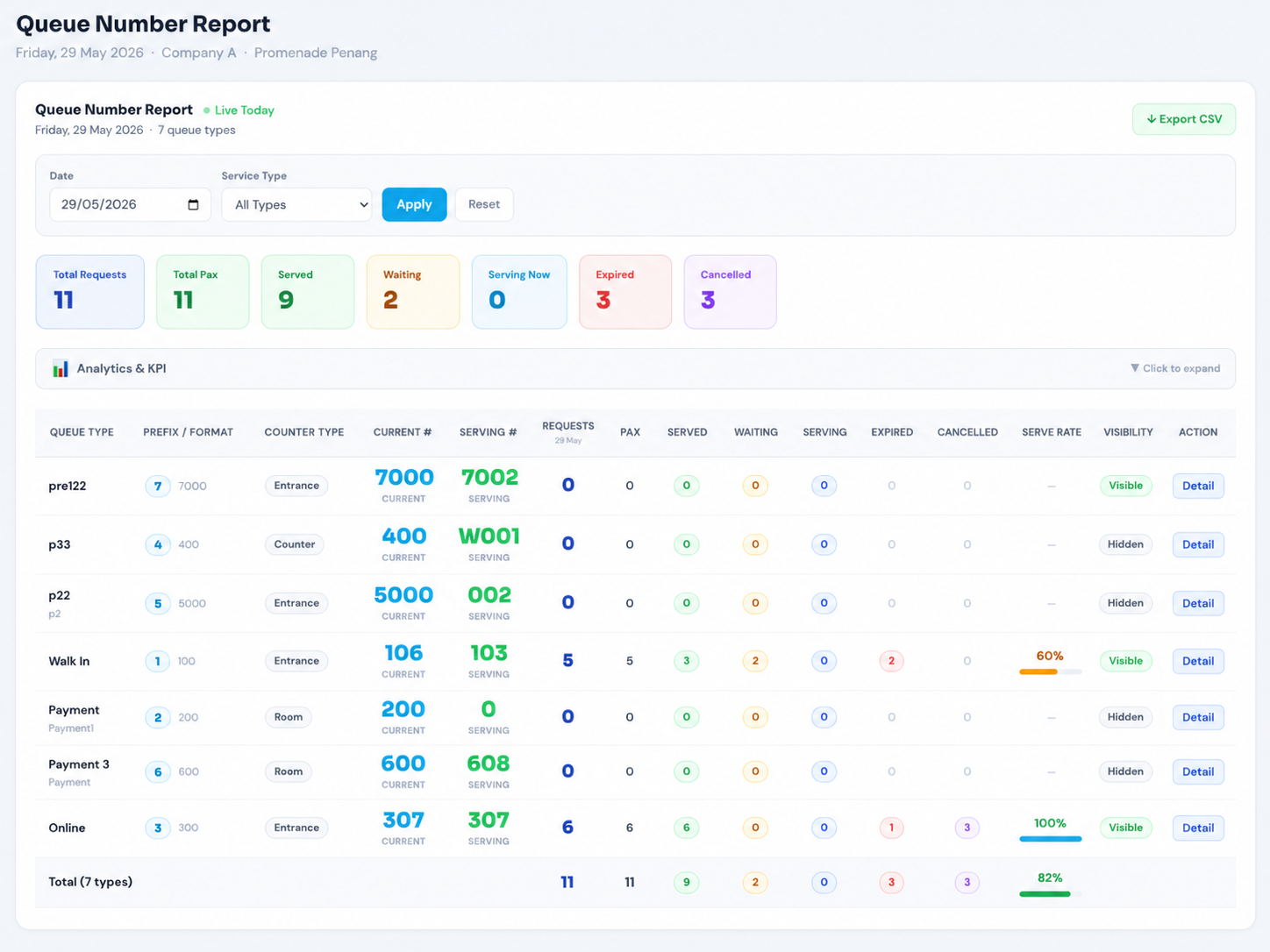
Cloud QMS Queue Number Report showing each queue type with prefix format, counter type, current number, serving number, requests, pax, served, waiting, serving, expired, cancelled, serve rate, and visibility status with live today indicator

🔢 Queue Number Report

A live, per-queue-type breakdown showing exactly where every queue stands right now — current number, serving number, and full status counts.

  • Live today viewReal-time current number and serving number for each queue type
  • Per-queue-type detailPrefix/format, counter type, requests, pax, served, waiting, serving, expired, cancelled
  • Serve rate per typeColour-coded serve rate bar for each queue type
  • Visibility statusSee which queue types are Visible or Hidden to customers
  • Totals row & CSV exportCombined totals across all queue types, exportable to CSV

Queue Control 6 features

Core

Next / Skip / Recall

One-click queue control — call the next customer, skip if absent, recall a previously served customer. All from the Queue Control panel.

Core

Cut Queue (Priority)

Pull any waiting customer to the front of the queue with one click. Perfect for VIPs, elderly, disabled, or urgent cases.

New

Expired / No-Show Marking

Staff marks called-but-absent customers as "Expired" with a required remark. Creates audit trail — tracked in all reports with no-show rates and flagged customers.

Core

Queue Push Feature

Push waiting customers to a different service queue or entrance. Useful when one counter finishes early and can take overflow from another.

Core

Multi-Counter Support

Multiple staff members can operate different counters simultaneously. Each counter has its own entrance number. Customers are called to specific counters.

Core

Filter by Service Type

Staff can filter the waiting queue by service type — only see customers for their department. Multi-department queues managed from one screen.

Customer Experience 6 features

Core

QR Code Queue Entry

Customers scan a QR code at your entrance — opens queue request page in browser instantly. No app download needed. Works on any smartphone.

New

Smart Estimated Wait Time

Auto-calculated from real serving data — shows minutes, people ahead, expected call time, and active counters. Updates every 4 seconds. Zero manual setup.

New

Customer Queue Cancellation

Customers cancel their own queue from their phone with a required reason. Ticket auto-disappears from staff queue in 3 seconds. Tracked in all reports.

Core

Live Queue Status Page

Real-time status page shows customer's position, queue number, and live updates. Shareable via link. Works on any device without app installation.

Core

Copy & Share Queue Link

Staff can copy any customer's live queue status URL and share via WhatsApp, SMS, or email. Customers track their position in real-time from anywhere.

Core

Customer Feedback & Ratings

Optional post-service feedback form — customers rate their experience. Enable or disable per company. Results shown in admin dashboard.

Queue Display 4 features

Core

TV Queue Display Screen

Full-screen TV display shows currently serving numbers per counter. Connect any TV via browser — no special hardware needed. Auto-refreshes in real-time.

Core

TTS Voice Announcement

Text-to-speech announces queue numbers aloud when called. Supports multiple languages including English, Malay, and Chinese. Works through TV speakers.

Core

Sound Alert / Chime

Audible chime plays when a new number is called. Gets attention in noisy environments. Configurable volume and sound type.

Core

Custom Counter Names

Name your counters anything — "Counter 1", "Room A", "Dr. Ahmad". Displayed on TV screen and announced via TTS when customer is called.

Appointment Booking 7 features

Customers book time slots online, staff checks in on arrival day. Works alongside walk-in queue. See full appointment page →

New

Online Booking Page

Shareable mobile-friendly booking link. Customers select date, time slot, fill details. Real-time availability with remaining slot count.

New

Flexible Time Slots

Admin defines time ranges with max capacity per slot. Unlimited slot rows. Enable, disable, edit, or delete individual slots anytime.

New

Staff Check-In Panel

Dedicated panel on Queue Control — search by IC or name, one-click check-in creates queue ticket with 📅 Appt badge automatically.

New

E-Appointment Ticket

Digital e-ticket with booking details, company location, print button, self-cancel option, and persistent link using unique token.

New

Appointment Calendar

Monthly calendar with colour-coded dots per day. Click any day to drill into full appointment list. CSV export, status filters, summary tiles.

New

Customer Self-Cancel

Customers cancel appointments online. Configurable cancellation policy (e.g. 24 hours before). After cutoff, directed to contact you directly.

New

QR Code for Booking

Generate and print a QR code for the booking link. Place at counter, entrance, or waiting area. Customers scan to book instantly.

Multi-Branch Management 5 features

Billing note: Each branch runs on its own subscription and is billed separately per branch. The HQ dashboard lets you manage and monitor all of your branch subscriptions together from one login — but each location is a standalone subscription.
New

Live Branch Dashboard

HQ admin sees all branches in one view — total, served, waiting, serving, expired, cancelled, pax per branch. Auto-refreshes every 30 seconds.

New

Remote Branch Settings

Edit any branch's company name, address, queue hours, max pax, counter limits, customer form fields, feedback toggle — all from HQ.

New

Branch Queue Types

Add, edit, toggle, reset counters per branch. See today's request and pax counts per queue type without logging into each branch.

New

Branch User Management

Add new users, suspend/reactivate accounts, reset passwords for any branch. All user management from HQ without sharing credentials.

New

Branch Appointment Config

Toggle appointment booking, manage time slots, set cancellation policies, and block dates — per branch, all managed from HQ admin.

Branch Comparison & Performance Ranking 6 features

Compare the queue performance of every branch side by side from a single HQ dashboard. The Branch Comparison tool ranks all your locations by serve rate, total requests, average wait time, expired rate, and cancellation rate — helping multi-location businesses identify top performers, spot underperforming branches, and make data-driven operational decisions.

New

Performance Ranking Table

All branches ranked in one sortable table — total requests, serve rate %, average wait time, expired %, cancel %, and total pax. The top-performing branch is highlighted with a gold ranking badge.

New

Click-to-Sort Any Metric

Click any column header to instantly re-rank all branches by that metric. Sort by serve rate to find your best performers, or by expired rate to spot branches needing attention.

New

Total Requests by Branch

Horizontal bar chart comparing total queue requests across every branch. Instantly see which locations handle the highest customer volume at a glance.

New

Serve Rate Comparison Chart

Colour-coded bar chart comparing serve rate % per branch. Green for high performers, amber for moderate, helping you benchmark service quality across locations.

New

Average Wait Time Chart

Bar chart showing average customer wait time per branch in minutes. Quickly identify which branches keep customers waiting longest and need staffing adjustments.

New

Expired vs Cancelled by Branch

Compare no-show (expired) and customer cancellation counts across all branches in one chart. Identify locations with high abandonment for targeted improvement.

Admin & Settings 6 features

Core

Role-Based Staff Access

Admin, Manager, Staff roles with different permission levels. Control who can access settings, reports, and queue operations separately.

Core

Queue Settings Control

Configure operating hours, daily ticket limits, max pax per ticket, max counters, queue number reset, prefix format, and start numbers.

Core

Per-Company Feature Toggle

Enable or disable features per company — appointment booking, feedback, IC collection. Companies without a feature see no changes.

Core

IC / Passport Collection

Optional field for customers to enter IC or passport number. Enables duplicate detection and customer database linking across visits.

Core

Custom Queue Prefixes

Set custom prefixes per service type (e.g. A001, B001, VIP001). Configure number format, starting number, and counter type independently.

Core

Daily Ticket Limit

Set maximum tickets per day per service type. When limit is reached, customers see "Queue is full" — prevents overbooking.

Reports & KPI Analytics 6 features

Core

Real-Time Dashboard

Live dashboard showing today's stats — total, served, waiting, serving, expired, cancelled. Status donut chart and queue type breakdown.

Core

KPI Analytics (8 Sections)

Comprehensive KPI analytics — serve rate, average wait time, peak hours, pax distribution, counter performance. Filter by date range.

New

Collapsible KPI Charts

Every report page has expandable interactive charts — status donut, serve rate bars, customer outcome, flagged customers. Hidden by default, expand on demand.

Core

Customer Database

Automatic customer database built from queue entries. Track visit history, frequency, IC number. See new vs returning customers over any period.

New

Flagged Customers

Automatically identifies customers with repeated no-shows and cancellations. Risk levels: High (3+), Medium (2), Low. Helps manage repeat offenders.

Core

CSV Data Export

Export any report as CSV — queue history, customer list, appointment data. Includes all fields: name, IC, phone, status, timestamps, remarks.

Alerts & Notifications 5 features

About WhatsApp notifications: WhatsApp messaging is an optional feature you can turn ON or OFF anytime. When enabled, WhatsApp messages are charged from RM 0.16 per message (standard WhatsApp Business / WABA messaging rate) — this is billed separately from your subscription. Voice announcement, sound chime, and TV display alerts are included at no per-message cost.

WhatsApp Ticket Confirmation

When a customer requests a queue ticket, an optional WhatsApp message is sent with their queue number and details. Toggle ON/OFF anytime. Charged from RM 0.16 per message (standard WABA rate).

WhatsApp "Your Turn" Alert

When staff calls a customer, an optional WhatsApp message is sent with their counter number — so they can wait anywhere. Toggle ON/OFF anytime. Charged from RM 0.16 per message (standard WABA rate).

Included

TTS Voice Call

Queue number announced by text-to-speech on the TV display. Supports English, Malay, Chinese. Configurable voice and volume. Included — no per-message cost.

Included

Sound Chime Alert

Audible chime plays before each TTS announcement. Gets attention in noisy environments. Works through any connected speaker. Included in your subscription.

Included

TV Display Update

Queue display screen updates instantly when a number is called. Shows queue number and counter name prominently — visible from across the room. Included in your subscription.

Security & Compliance 5 features

Core

100% Cloud Hosted

Hosted on secure cloud infrastructure. No local server needed. Accessible from any browser — computer, tablet, phone. Automatic backups.

New

Admin Audit Log

Every settings change, user action, and branch management action is logged — who, what, when, for which branch. Full traceability for compliance.

Core

Role-Based Permissions

SUPERADMIN, Admin, Manager, Staff — each role has different access levels. Staff cannot access settings or reports unless permitted.

Core

Duplicate Prevention

Same IC number cannot book twice for the same date (appointments). Database-level locking for concurrent requests prevents double-booking.

Core

Staff Session Log

Track staff login/logout times and which counters they operated. Monitor active sessions and productivity per staff member.

Ready to Get Started?

All features are included in every Cloud QMS and WhatsApp QMS subscription — no per-feature add-on fees. Each branch is billed as its own subscription. Request a demo or WhatsApp us for pricing.