LAN Queue System Solution

Browser-based queue management accessible from any PC, laptop, or Android device on your local network — no software installation needed on client machines.

LAN Queue Management Web Server Solution
LAN Web Server

Queue Management via Browser — Any Device, Any Counter

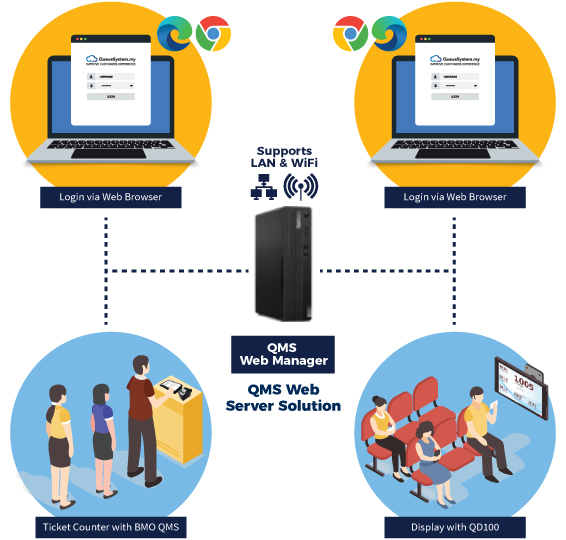
The QSYS WEB server hosts your entire queue management system locally. Counter staff open a URL in their browser — no installation, no driver setup. Manage from a PC, laptop, tablet, or Android phone anywhere on your network.

  • Access from any web browser — Chrome, Edge, Firefox
  • Zero software installation on client machines
  • Centralised WAMP server manages all queue data
  • Real-time sync — all counters update simultaneously
  • Role-based access — admin, counter staff, manager
  • Works on PC, laptop, tablet, and Android devices
  • No cloud dependency — fully contained on your LAN
Get Quote View Packages
System Components

What's Inside the QSYS WEB System

Queue Manager CPU Server

The central brain of the system. Hosts the web application and manages all queue data over your LAN.

  • BMO QMS Web Queue Manager software
  • WAMP server pre-configured
  • Accessible via LAN IP address
  • Supports multiple simultaneous connections

QTP-150 Ticket Dispenser

Customers select their service and receive a printed queue ticket. Connects to the server via WiFi.

  • Touchscreen ticket selection interface
  • WiFi connection to LAN server
  • Programmable service type buttons
  • Multiple ticket layout options

QD-100 Queue Display

Connected to any TV via HDMI — shows live queue numbers and counter info automatically.

  • HDMI to any LCD/LED TV
  • Custom display layouts & branding
  • Sound alert when number called
  • WiFi connected to LAN server
Features

Everything You Need in One LAN System

Any Device Access

Counter staff use any PC, laptop, or tablet — just open the URL. No installation ever.

Real-Time Updates

Every action instantly reflected across all counters and display screens on the network.

Role-Based Access

Admin, counter staff, and manager roles — each sees only what they need.

Queue Push

Transfer customers between service counters without issuing a new queue ticket.

Analytics & Reporting

Track wait times, serve rates, peak hours, and counter performance over time.

Offline-First LAN

No cloud. All data stays on your server — fast, private, and available even without internet.

Compare

LAN System vs WhatsApp Cloud QMS

Not sure which system is right for you? Here's how they differ — choose based on your setup.

LAN Queue System
  • No internet required
  • Data stays on-premise
  • Physical ticket printing
  • One-time cost only
  • Browser-based, no installs
  • No WhatsApp notifications
  • Customers must stay in area
VS
WhatsApp Cloud QMS
  • Needs internet connection
  • Cloud-hosted data
  • Digital tickets only (no printer)
  • Monthly subscription fee
  • No hardware needed at all
  • Real-time WhatsApp alerts
  • Customers wait anywhere
Not sure which is right for your business? Ask our team for a free recommendation →

Ready to Set Up a LAN Queue System?

Our team handles the full setup — server configuration, network integration, display setup, and staff training.