
Event Management System

Manage Events Better with QR Registration & Fast Check-In

A complete event flow management system that helps organizers reduce queues, improve check-in speed, track attendance live, and collect better data for follow-up. BMO Event Management System helps organizers manage the full attendee journey for many types of events, including education fairs, exhibitions, product launches, open days, roadshows, campus events, corporate events and public campaigns. From event setup and QR registration to OTP verification, personal entry QR codes, on-site scanning and live attendance tracking, everything is managed in one workflow.

Public registration URL + QR code Email OTP verification Personal entry QR code Live attendance dashboard
Suitable for fairs, exhibitions, open days, roadshows, campus events, education events and corporate registrations.
Event registration and check-in system in use
Event setup system screenshot
Event Setup & Registration QR Generation
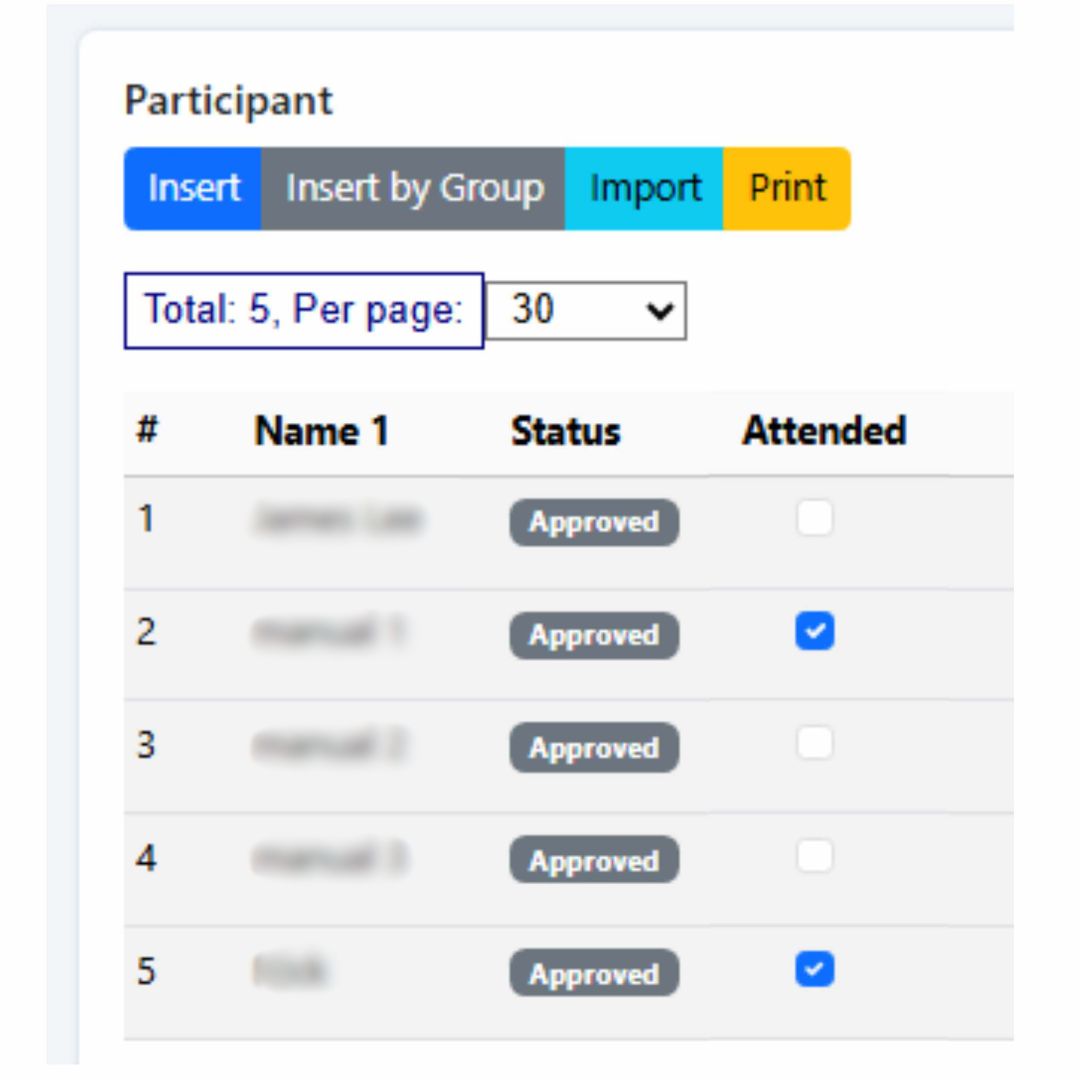
Attendance dashboard screenshot
Live Attendee Attendance Summary
Suitable for Many Types of Events
Education Fairs
Exhibitions
Product Launches
Open Days
Roadshows
Campus Events
Corporate Events
Public Campaigns
Scenario Flow

How the Event Management Flow Works

Here is how BMO Event Management System supports a complete event workflow, from pre-event setup to real-time attendance updates on event day.

1
🛠️

Set Up the Event

Create the event by adding the event name, date, venue and attendance capacity. The system then generates a public registration URL and QR code.

2
📢

Promote the Event

Share the registration QR code through posters, social media, WhatsApp, email campaigns, websites, partners and event marketing materials.

3
📝

Public Registration + OTP

Visitors scan the QR code, submit their details online and verify through a 6-digit OTP sent to email for better registration accuracy.

4
📧

Receive Personal Entry QR

After successful registration, each attendee receives a confirmation email with a unique personal entry QR code for event admission.

5

Check-In & Live Tracking

On the event day, staff scan each attendee’s QR code and the dashboard updates attendance status instantly for live monitoring and reporting.

Event setup screenshot

1. Event Setup

Create event details and generate the public registration QR code.

Public registration screenshot

2. Registration Form

Visitors register using their phone through the public online form.

OTP verification screenshot

3. OTP Verification

Email verification helps confirm identity and improve data accuracy.

Personal QR email screenshot

4. Personal QR Email

Each attendee receives a unique QR code for quick event entry.

Scanner device screenshot

5. On-Site Check-In

Staff scan the attendee QR code and attendance is updated instantly.

Visitors registering before an event

Before the Event

Collect registrations earlier through QR code campaigns so your team can prepare ahead, estimate turnout and reduce manual registration at the venue.

Visitors checking in at event entrance

On Event Day

Speed up attendee entry with personal QR check-in while your team tracks attendance status in real time from the dashboard.

General Event Use Case

Suitable for Many Types of Events

This workflow is suitable for education fairs, exhibitions, product launches, open days, roadshows, campus events, corporate events, public campaigns and any event that needs cleaner registration data and faster on-site attendance tracking.

Promote Registration Earlier

Use the public registration QR code across online and offline channels to encourage sign-ups before the event starts.

Collect Attendee Details Online

Capture attendee information in a more structured way before event day instead of relying fully on walk-in paperwork.

Send Confirmation Automatically

Let the system send confirmation emails and personal QR codes automatically after registration is completed.

Check In Faster at the Venue

Use the scanner device at the entrance to confirm attendance instantly and keep the entry flow more organized.

Use the Data After the Event

Review attendee data for reporting, lead follow-up, engagement campaigns and future event planning.

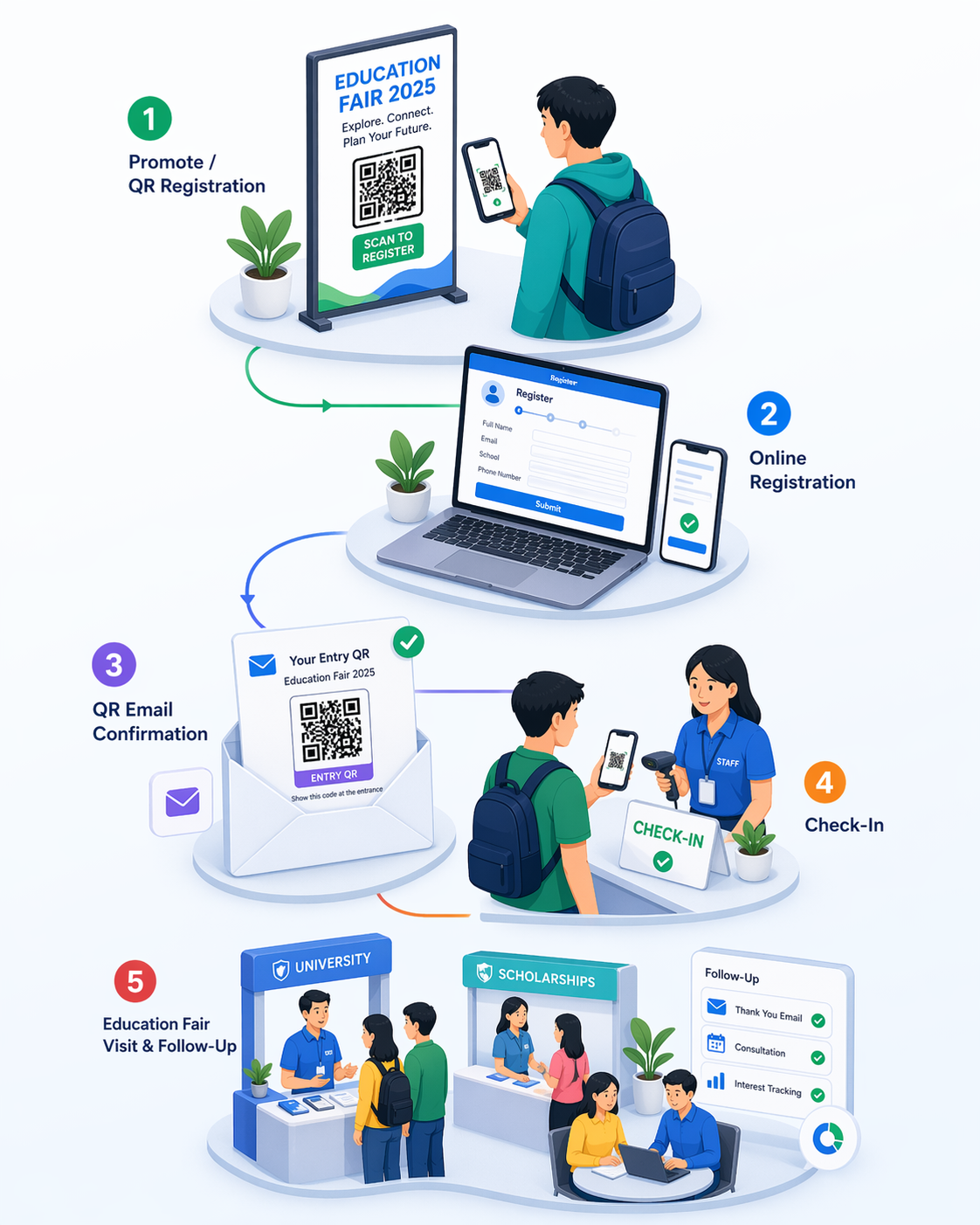
Education Fair Example

How It Works for an Education Fair

For an education fair, the system helps organizers promote registration earlier, reduce congestion at the venue and track student and parent attendance more accurately. Visitors register online, receive a personal entry QR code by email, and check in quickly at the entrance on event day.

Promote the Fair

Share the QR registration link on social media, school networks, posters, websites and event materials.

Students and Parents Register

Visitors complete their registration online before arriving, helping organizers estimate turnout and prepare booth staffing.

Confirmation Email Sent

Each registrant receives a unique QR code that can be shown from a mobile phone for fast event entry.

Fast Check-In at the Entrance

Event staff scan the QR code using the scanner device, instantly confirming attendance and reducing long registration lines.

Post-Event Follow-Up

Use the attendee list for follow-up on course enquiries, consultation appointments, campus visits and future marketing.

Education fair example using event management system
Product Launch Example

How It Works for a Premium Product Launch

A strong scenario example for this page is a premium consumer electronics launch, such as new flagship wireless headphones. The system helps your team invite guests, manage registrations, speed up entry and track attendance live during the launch event.

Promote the Launch

Share the registration QR code through social media, invitation emails, partner pages, event banners and marketing materials before launch day.

Guests Register Online

Interested guests register online in advance so your team can estimate attendance, manage VIP lists and prepare the event more efficiently.

Personal Entry QR Sent by Email

Each guest receives a confirmation email with a personal QR code for secure and fast check-in at the product launch venue.

Check-In, Launch & Follow-Up

On event day, staff scan the QR code at the entrance. Your team can then track live attendance and use the final guest list for post-event follow-up and marketing.

Product launch event management flow diagram
Premium guest experience Faster event entry Better attendance tracking Useful follow-up data
Organizer Dashboard

Live Tracking for Organizers

Once an attendee is scanned at the entrance, the system updates the status to attended automatically, giving organizers instant visibility into event turnout.

Participant attended summary dashboard
Real-Time Attendance Status Track who has registered, who has checked in, and who has not yet arrived during the event.
Better Crowd Management Know the live turnout so your staff can manage entry counters, event halls, booth traffic or registration areas more effectively.
Cleaner Event Data Reduce manual attendance errors with QR-based check-in and email-verified registration records.
Useful for Reporting Use the data to prepare attendance reports, post-event summaries and follow-up campaigns.
Supports Multiple Entry Points Useful for events with multiple halls, sections or entry points, helping you monitor attendance across different areas.
Key Benefits

Why Organizers Use This for Their Events

Whether you are organizing a fair, exhibition, roadshow, open day, education event or corporate gathering, this workflow helps you run a more organized and professional event.

Easy QR Registration

Let attendees register quickly through a public QR code instead of relying only on manual walk-in forms.

Verified Attendee Records

Email OTP verification helps improve data accuracy and reduce incomplete or invalid registrations.

Faster Event Entry

Attendees simply show their QR code for scanning, helping reduce congestion at registration and entrance points.

Live Attendance Monitoring

See who has attended in real time so your team can react quickly during the event.

Better Reporting

Get structured attendance data for reporting, post-event analysis and follow-up marketing.

Better Visitor Experience

Visitors enjoy a smoother registration and check-in experience with less waiting and less confusion.

Event organizers using event management system

Need a More Professional Way to Manage Your Events?

Use BMO Event Management System to manage registration, QR code admission and live attendance tracking in one smoother workflow.

Registration link and QR code generation
Email OTP verification
Personal QR code for each attendee
On-site scanning and instant attendance update
FAQ

Frequently Asked Questions

Common questions about using the system for events, fairs and registration-based campaigns.

Can this system be used for different types of events?
Yes. It is suitable for fairs, exhibitions, open days, education events, roadshows, public campaigns, corporate events and any event that needs registration and attendance tracking.
How do attendees register?
Attendees scan the public registration QR code, fill in their details online, verify via email OTP and receive a personal entry QR code by email.
What happens during event check-in?
Staff scan the attendee’s personal QR code using the scanner device. The system immediately confirms success and updates the attendee status to attended.
Can organizers monitor attendance live?
Yes. The organizer dashboard provides a real-time participant list and automatically updates the attended status once a QR code is scanned.