Local Web Queue System — LAN-Based

Powerful Queue Control
On Your Local Network

A complete queue management system hosted on your premises — browser-based counter software, physical ticket dispenser, and TV display. Works entirely on your LAN. No internet, no cloud, no monthly fees.

No internet required
No software to install
One-time cost, no subscription
0
Internet Needed
50
Max Counters
0
Monthly Fees
18+
Years Experience
Local Web Queue System Malaysia — LAN Browser-Based
System Components

3 Components. One Complete Local System.

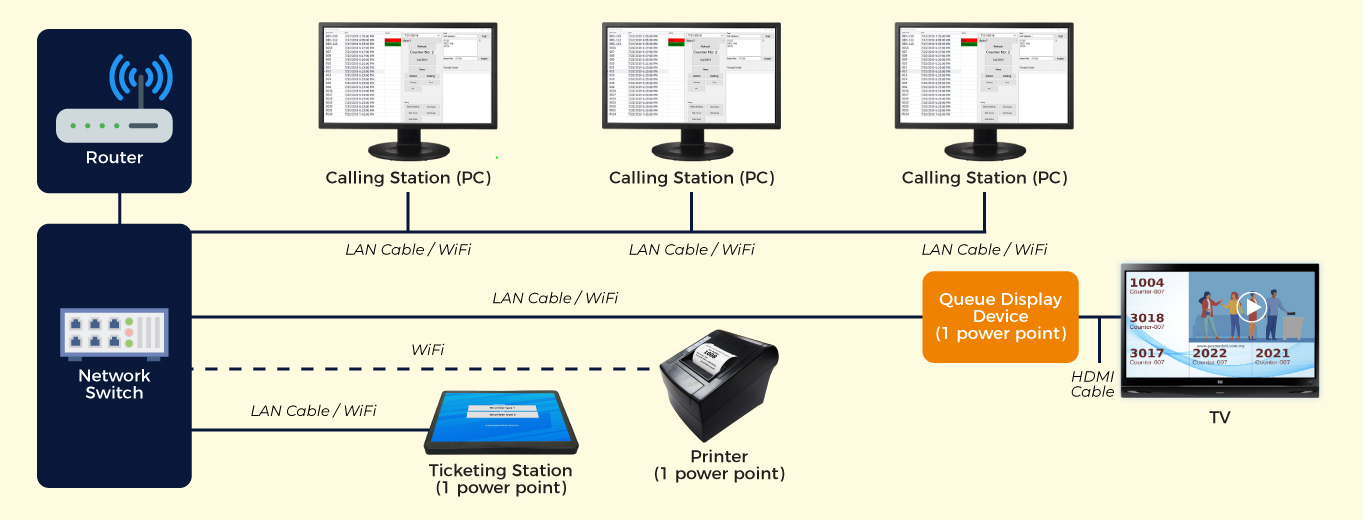
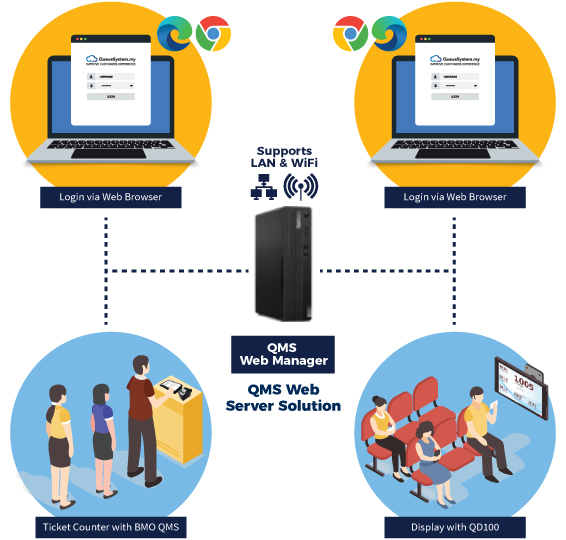
All hardware communicates over your LAN WiFi — fully self-contained, no cloud dependency, no internet required.

1
🖨

Ticket Dispenser

At the entrance — customer taps service type, printer outputs ticket in under 3 seconds.

  • QTP-150, P1500, or Q-Kiosk
  • Touchscreen service selection
  • Thermal auto-cut ticket printing
  • WiFi connected to LAN server
2
🖥

Queue Manager — Browser

Counter staff open a URL in any browser — call next, skip, push from their desk.

  • Works on any browser (Chrome, Edge)
  • PC, laptop, tablet, Android
  • NEXT · SKIP · PUSH · RECALL
  • Role-based login per counter
3
📺

Queue Display on TV

QD-100 device connected to any TV via HDMI — shows serving number with sound alert.

  • HDMI to any LCD/LED TV
  • Large visible queue number
  • Sound chime on every call
  • Custom branding & layouts
Local Web Queue System Architecture Malaysia

All 3 components communicate over your local WiFi — no internet required at any point

Step by Step

How the Local Web Queue System Works

From customer walking in to being served — a smooth, professional, and fully offline-capable experience.

Replace with WEB-2
Ticket Dispenser Screen
QTP-150 or P1500 device — customer taps service type, ticket prints instantly
1

Customer Taps Service — Ticket Prints Instantly

Customer walks to the ticket dispenser kiosk. They tap their required service type on the touchscreen. The thermal printer immediately outputs a clean queue ticket — number, service type, and time stamped.

  • Under 5 seconds — from tap to ticket in hand
  • A001, B001, C001 — ticket prefix keeps queues visually clear
  • No phone needed — works for any customer, any age
  • Fully self-service — no staff needed at dispenser
Replace with WEB-3
Queue Display TV Screen
TV showing currently-serving number, counter name, and branding
2

Customer Waits & Watches the TV Display

The customer sits in the waiting area and watches the TV display. It shows the currently-serving number for each counter — updating instantly when a new number is called. A sound chime plays so customers don't need to watch constantly.

  • Large readable numbers — visible across the room
  • Sound alert — chime every time a new number is called
  • Multi-counter view — all counters on one screen
  • Optional video/image — promotional content alongside numbers
Replace with WEB-1
Queue Manager — Browser Screen
Staff browser showing queue list, NEXT · SKIP · PUSH · RECALL buttons
3

Staff Calls Next Customer — From Browser

When ready, the counter staff clicks NEXT in their browser-based Queue Manager. The TV display updates immediately to their number, the sound plays, and the customer walks up.

  • Open in any browser — no software installation needed on counter PC
  • NEXT · SKIP · PUSH · RECALL · CUT — full call controls
  • Auto-refreshes — no manual page reload needed
  • Works on PC, laptop, tablet, Android — any device with a browser
Replace with WEB-1 (PUSH)
Queue Push Feature
Transferring customer from Counter A (Doctor) to Counter B (Pharmacy)
4

Multi-Stage Service? Push to Next Department

For services requiring multiple stages, the staff clicks PUSH and selects the next counter. The customer's ticket number moves to that queue — no new ticket, no re-queuing, no confusion.

  • Clinic — doctor pushes patient to pharmacy counter
  • Bank — counter staff pushes customer to manager
  • Government — department-to-department transfer
  • One ticket, entire journey — never queue twice
Features

What You Get with Local Web QMS

Browser-Based — Zero Install

Counter staff open a URL — that's it. No software on client PCs. Works on Windows, Android, or any modern browser.

Offline LAN — No Internet

All data lives on your local WAMP server. System runs 100% during internet outages. Perfect for government, hospitals, and rural areas.

Queue Push Feature

Transfer customers between departments without new tickets. Full multi-stage service support — healthcare, banking, government.

Up to 50 Counters

Add more counters by simply adding more devices to the LAN. No server changes needed. Start small, scale freely.

Branded TV Display

Customise the waiting room display with your logo, brand colours, background images, and even YouTube video content.

Analytics & Reporting

Track queue performance, wait times, serve rates, and peak hours. Export data to CSV for management reports.

Full Comparison

All 3 Queue Systems — Side by Side

Compare Local Web QMS, Cloud QMS, and WhatsApp QMS to find the right fit for your business.

Feature Local Web QMS Cloud QMS WhatsApp QMS
Internet required
Physical ticket dispenserOptional add-onOptional add-on
TV display screen (HDMI)
WhatsApp notification to customer
Customer can wait off-site
Works for non-smartphone usersNeed phone for QRNeed WhatsApp
Queue Push feature
KPI analytics dashboard
Monthly subscription feeRM 200/moRM 100/mo
Hardware required Server + Dispenser
Starting costRM 5,899 (one-time)RM 599 setupRM 599 setup
Best forGovernment, HospitalsClinics, RetailModern, Any sector
Not sure which fits your business?   Ask our team — free advice
Packages

Local Web QMS Packages

One-time investment — own the system outright. No monthly fees, no subscriptions ever.

QSYS WEB

LAN Web Server Solution
RM6,999
One-Time Investment
  • BMO QMS Web Queue Manager
  • Queue Manager CPU Server (WAMP)
  • QD-100 Queue Display (HDMI → TV)
  • QTP-150 Ticket Dispenser
  • Multi-device browser access (LAN)
  • Setup & staff training

QSYS KIOSK

All-in-One Self-Service
RM7,999
One-Time Investment
  • 17" Q-Kiosk floor kiosk server
  • Queue Manager Software License
  • QD-100 Queue Display
  • Complete setup & installation
  • Staff training included
  • Priority support plan

All packages are one-time investments — no monthly fees after purchase. Optional warranty extension +RM 500. Full specs & add-ons →

FAQ

Frequently Asked Questions

Does it really work with no internet?
Yes — completely. All data is stored on your local WAMP server, not in the cloud. The system runs during internet outages without any interruption. This is the single biggest advantage of Local Web QMS over cloud-based systems.
Do I need to install software on every counter PC?
No installation needed on counter PCs. Staff simply open a web browser and type the server's local IP address. The Queue Manager interface loads instantly — exactly like opening a website.
What devices can staff use as counters?
Any device with a modern browser — Windows PC, laptop, Android tablet, or Android phone. The interface is fully responsive and works on all screen sizes.
Is there a monthly fee?
No. Local Web QMS is a one-time investment. After paying the package price, there are no monthly fees, no subscriptions, and no recurring costs (excluding optional warranty extension at RM 500/year).
What is the difference between Local Web QMS and Cloud QMS?
Local Web QMS runs on a server in your office over your LAN — no internet needed. Cloud QMS is hosted on our cloud servers — internet required, but no hardware needed. Local Web QMS uses physical ticket printers. Cloud QMS uses QR code + browser queue entry. Choose Local if you need offline reliability. Choose Cloud if you want zero hardware.
How many counters can the system support?
Up to 50 service counters in a single installation. Each counter runs the Queue Manager in their own browser session on the same LAN network.
How long does installation take?
Standard setups (1–3 counters) typically take 2–4 hours including staff training. Larger multi-counter setups may require a full day. Our team handles everything on-site.

Ready for a Reliable Local Queue System?

Our team handles everything — hardware delivery, LAN setup, display configuration, and full staff training. Available in KL, Penang, and Johor.