Customer CRM & Insights

Know Your Customers —
Not Just Your Queue Numbers

Every customer who joins your queue is automatically saved, profiled, and segmented. See who your regulars are, spot who's slipping away, and follow up in one tap — all from the same web portal, with no extra admin work.

Auto-captured from your queue
Built into your portal
Respects opt-outs
16
Live Metrics
4
CRM Tools
1
Tap to Follow Up
0
Extra Admin Work
Live customer analytics
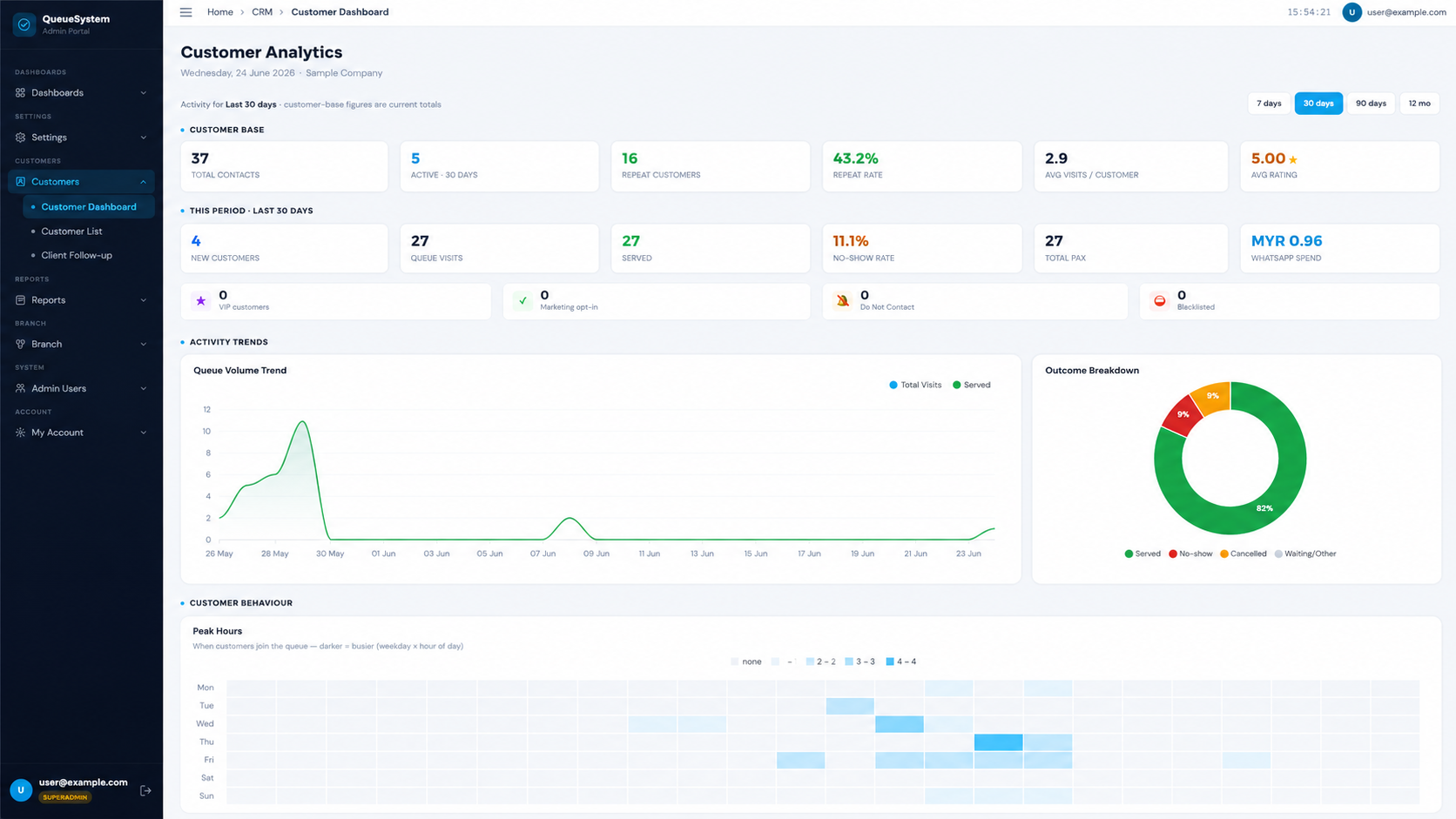
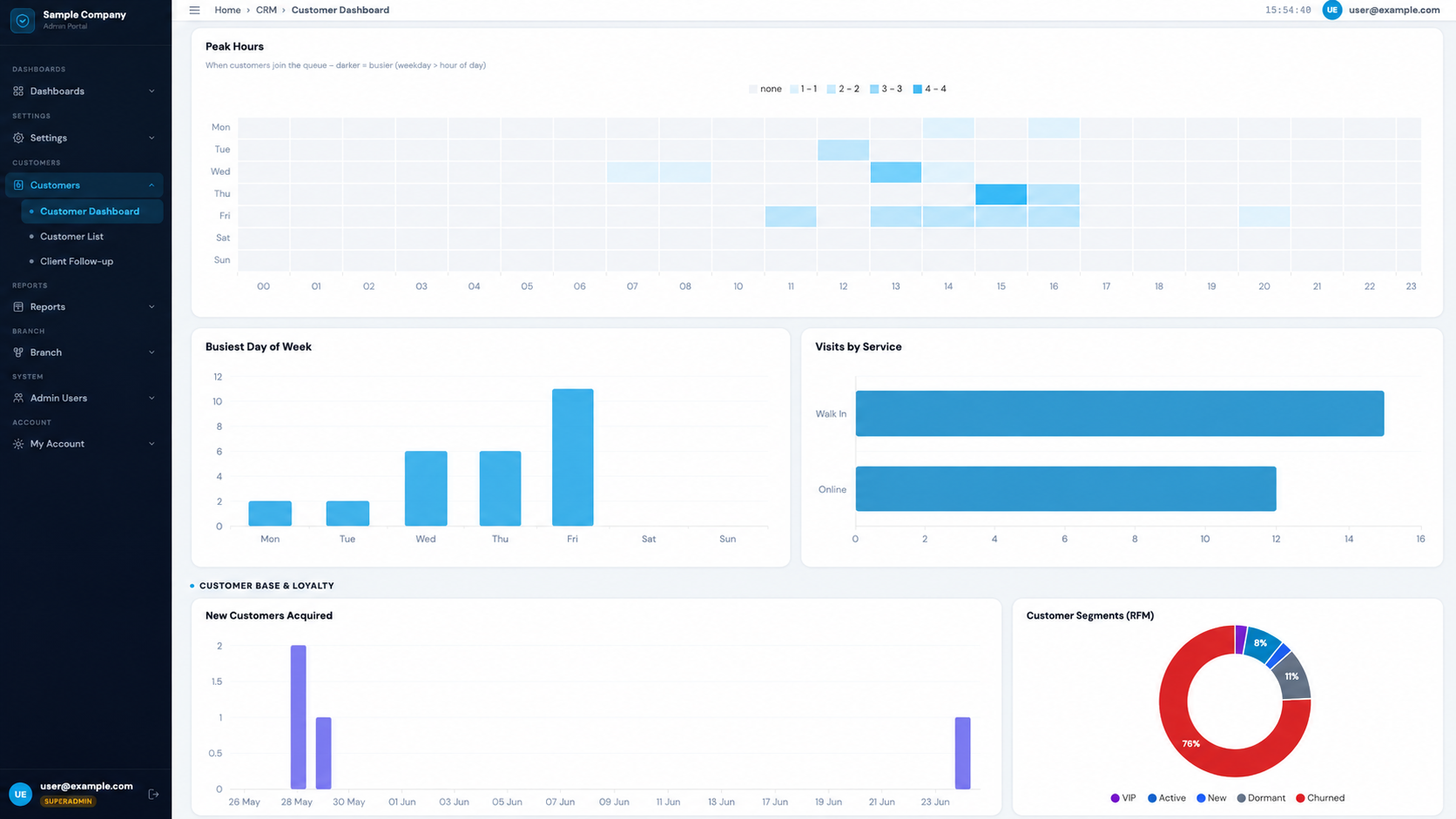
Customer analytics dashboard showing KPIs, peak hours heatmap and segments — QueueSystem.my
One-tap follow-up
What's New

Your Queue Already Knows Your Customers. Now You Can Too.

Your Cloud or WhatsApp QMS already captures each customer's phone number when they take a queue number. Customer CRM & Insights builds on that automatically — turning raw tickets into customer profiles, visit patterns, loyalty segments, and ready-to-action follow-up lists. No forms to fill, no separate CRM to maintain. Just open your portal and see your customers clearly.

Before — Customer Database
  • Contacts captured from queue tickets
  • A plain list of phone numbers
  • Manual export only
  • No follow-up tooling
  • No consent tracking
Now — Customer CRM & Insights Upgraded
  • Same auto-capture — zero extra work
  • Customer profiles with their visit history
  • Analytics dashboard, segments & peak-hour patterns
  • Client follow-up lists with one-tap WhatsApp
  • Consent & Do-Not-Contact tracking
Already included in your Cloud & WhatsApp QMS web portal — now smarter.
Inside the CRM

Four Tools That Turn Queues Into Customers

Everything below is built from the queue activity you already collect — and lives in the same admin portal.

Peak hours heatmap, busiest day of week and RFM customer segments — QueueSystem.my CRM
Customer Analytics · Peak Hours & Segments
Module 1

Customer Analytics Dashboard

Understand your customer base at a glance.

A live dashboard that answers the questions every owner asks: Who are my best customers? When are we busiest? What do people come for? Are customers happy?

Total contacts Repeat rate Avg visits / customer Avg rating New customers 16 metrics in total
  • Peak Hours heatmap — see exactly which days and hours customers join your queue, so you can staff smarter
  • Busiest day of week and most-requested services
  • Customer segments (RFM) — VIP, Loyal, Active, New, At-risk and Churned, automatically
  • Filter by last 7 / 30 / 90 days or 12 months
Plan staffing around real peak hours and spot your most valuable customers — using data your queue already collects.
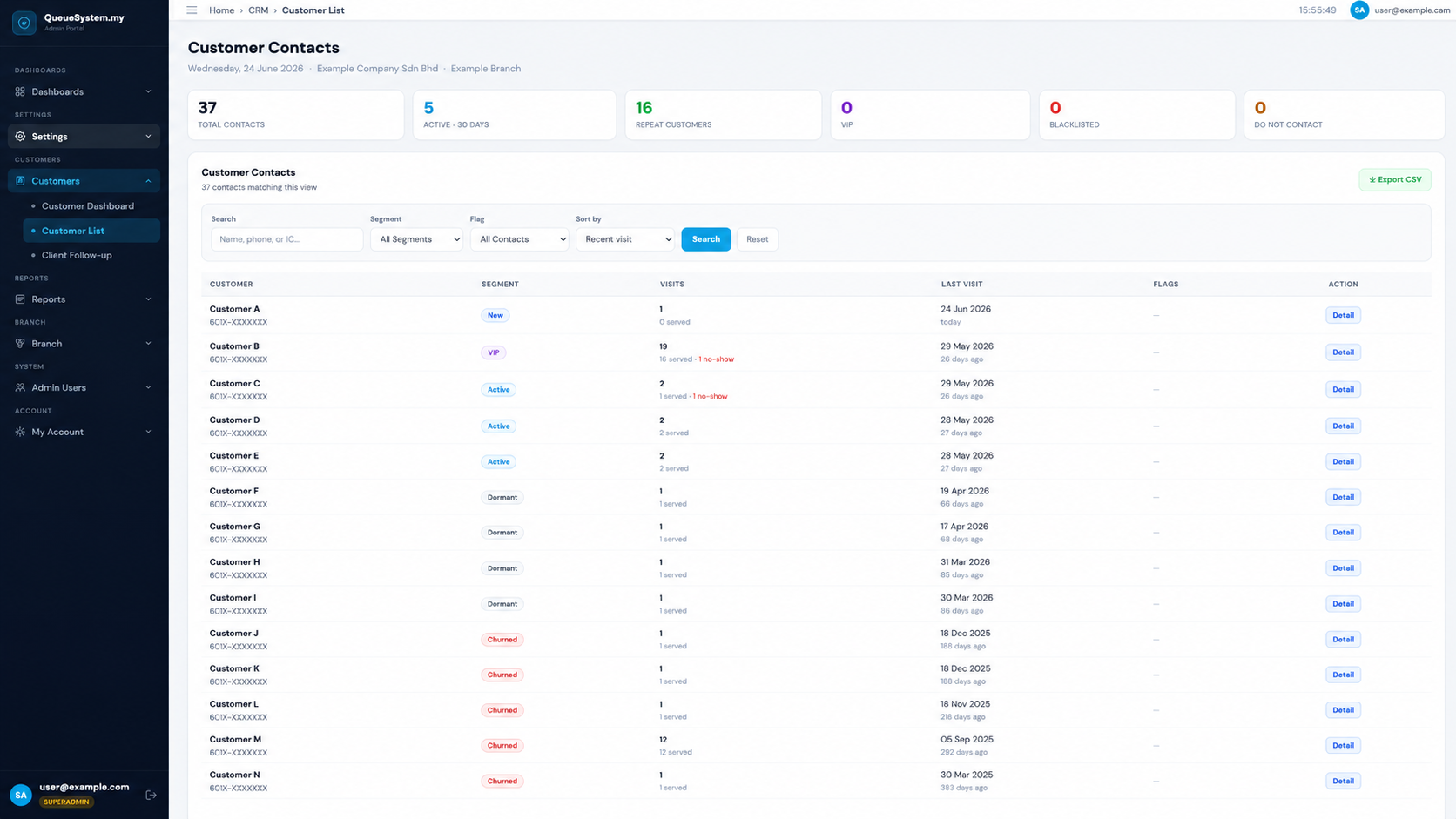
Searchable customer list with segments and flags — QueueSystem.my CRM
Customer List · Searchable Directory
Module 2

Customer List & Directory

Every customer, searchable in seconds.

A clean, searchable directory of every contact, with the context your staff need before they pick up the phone.

  • Search by name, phone, or IC
  • Filter by segment (VIP, Loyal, At-risk…) or flag (VIP, blacklisted, opted-in)
  • See visits, last-visit recency, and status at a glance
  • One-click detail view with key stats, WhatsApp and "View Full Profile"
  • Export to CSV for campaigns or reporting
Find a customer in seconds and see their history before you say hello.
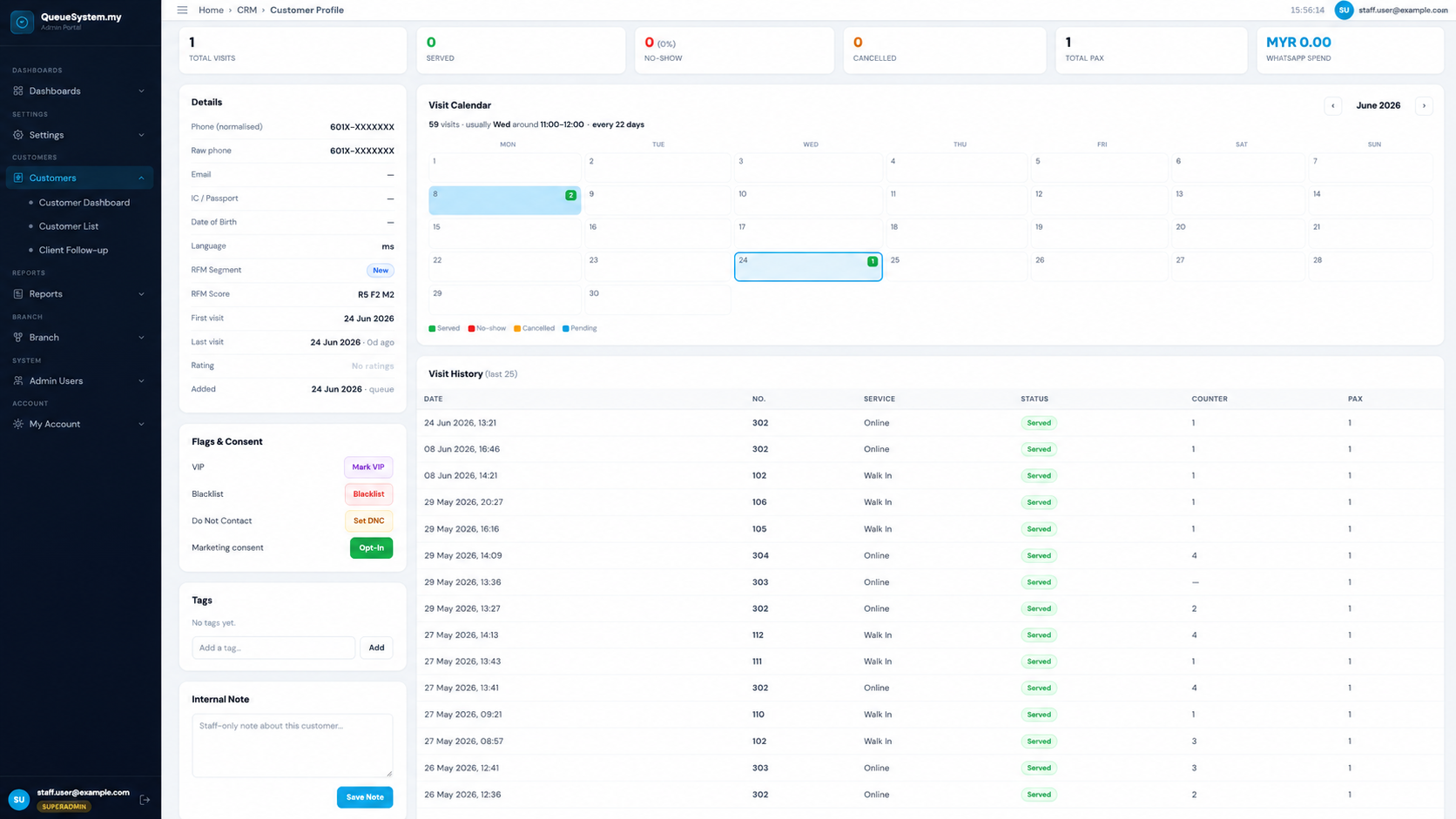
Customer profile with visit calendar showing visit pattern and history — QueueSystem.my CRM
Customer Profile · Visit Calendar & History
Module 3

Customer Profile & Visit Calendar

A clear picture of every customer.

A detailed profile page for each customer — built from the queue activity you already collect.

  • Key stats: visits, served, no-shows, cancellations, pax and spend
  • Visit Calendar showing their usual day, usual time and average gap between visits
  • Recent visit history, WhatsApp message history and feedback
  • Tags, internal notes and RFM segment
  • VIP, blacklist and consent controls — plus one-tap WhatsApp
Spot each customer's pattern at a glance — perfect for timing reminders and personal service.
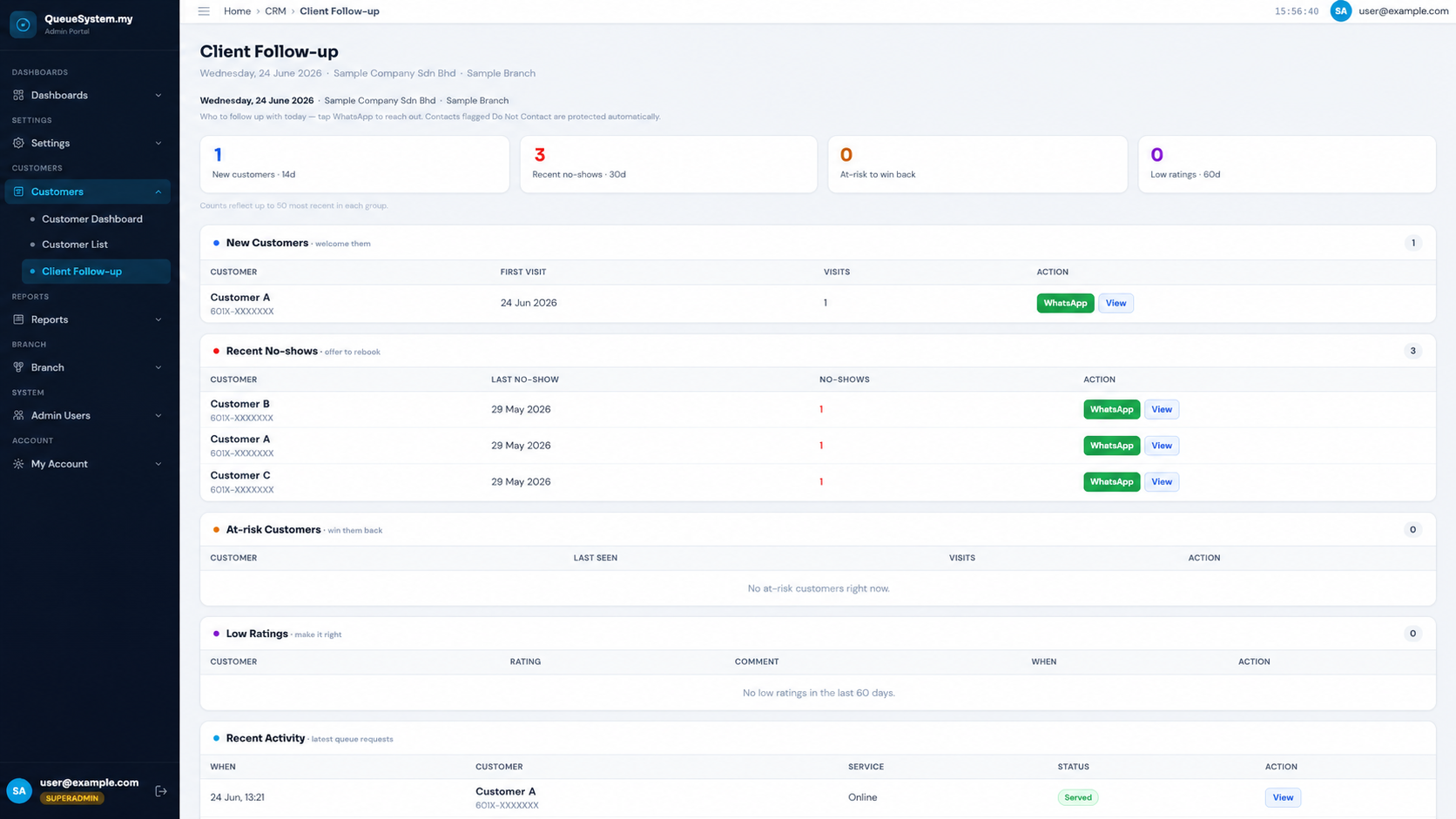
Client follow-up list with one-tap WhatsApp for no-shows and at-risk customers — QueueSystem.my CRM
Client Follow-up · Daily Action List
Module 4

Client Follow-up

Stop guessing who to call. Start following up.

A daily action list that shows your team who to reach out to and why — each with a pre-written WhatsApp message ready to send.

  • New customers → send a welcome
  • Recent no-shows → offer to rebook
  • At-risk customers → win them back  ·  Low ratings → make it right
  • One-tap WhatsApp with a message already drafted for each situation
  • Do-Not-Contact aware: customers marked Do Not Contact are automatically protected — staff can't message them by mistake
Recover no-shows, win back lapsing customers and fix unhappy experiences — in one tap, the right way.

More From the Portal

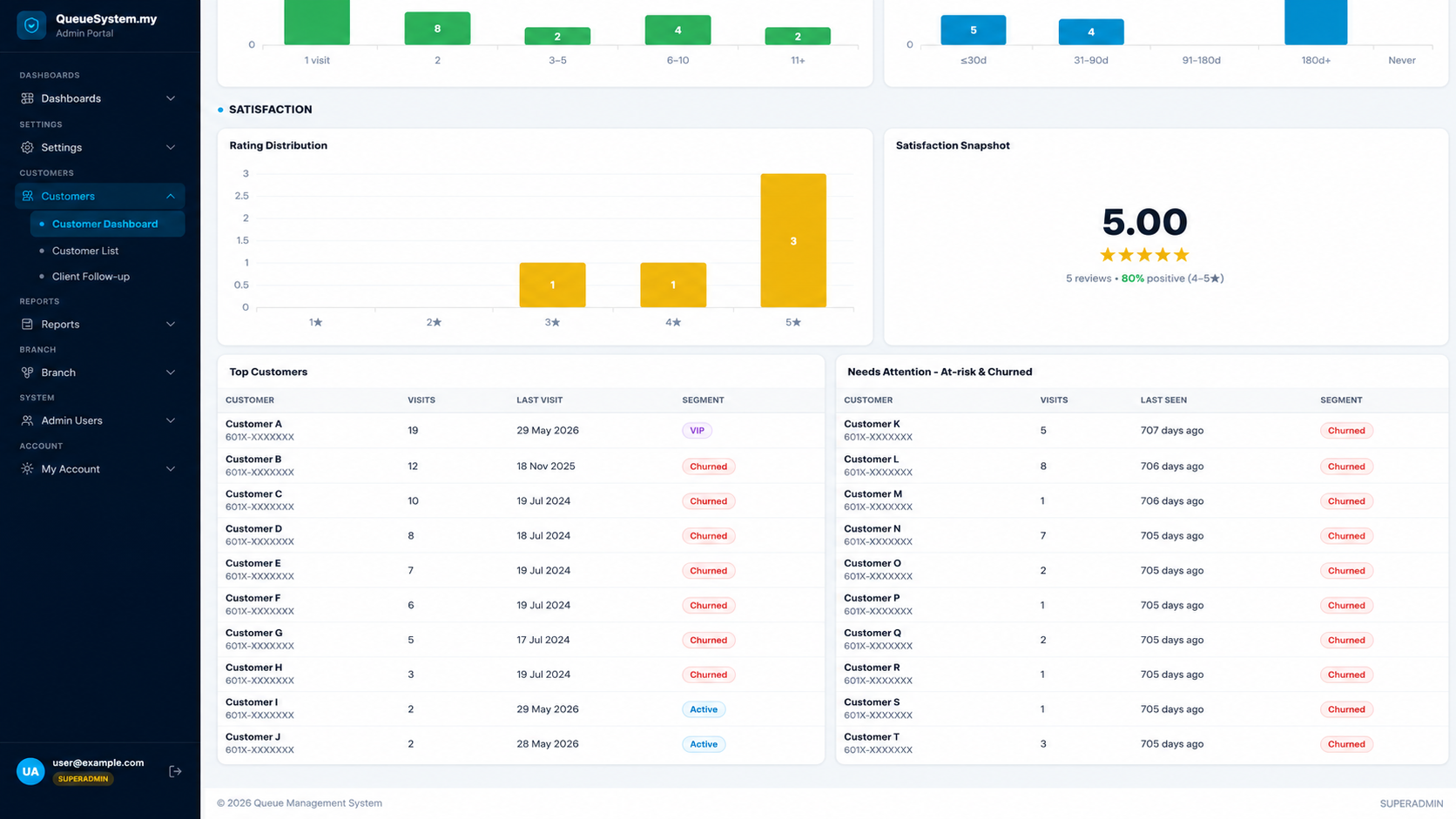
Visit frequency, recency and satisfaction with top customers and at-risk list
Loyalty & Satisfaction

Frequency, Recency & Ratings

Visit-frequency and recency breakdowns, rating distribution, top customers and an at-risk watchlist.

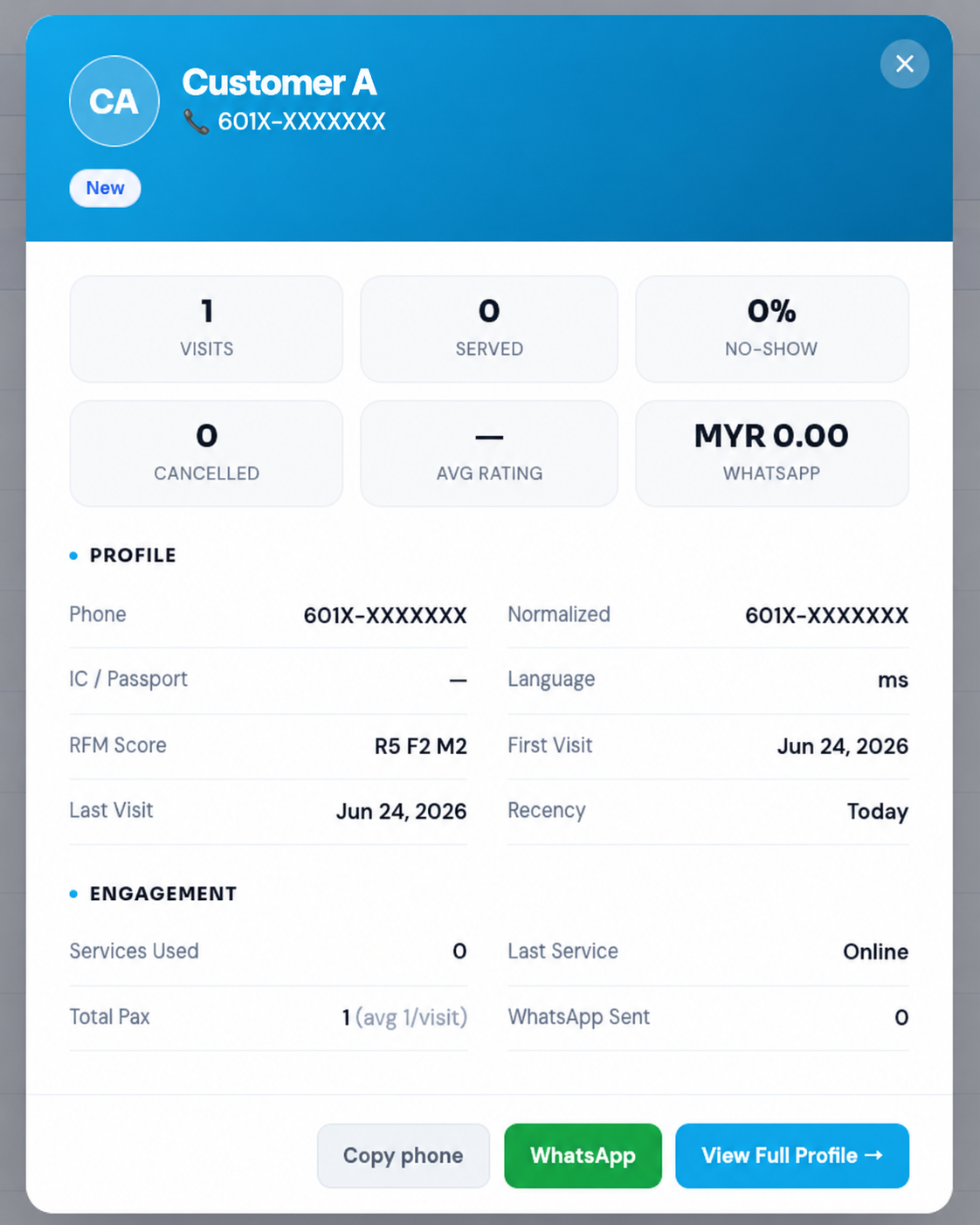
Customer quick-view card with stats, WhatsApp and view full profile
Quick-View Card

One-Click Detail View

Open any contact for instant stats, RFM score, recency, and Copy phone / WhatsApp / Full Profile actions.

Customer base KPIs and activity trends with outcome breakdown
Customer Base KPIs

Base & Activity Trends

Customer-base totals, this-period activity, queue volume trend and a served / no-show / cancelled breakdown.

How It Works

Built From the Queue You Already Run — in 3 Steps

No new hardware. No extra forms. It works with the queue you already run.

1
📲

Customers Join as Usual

By WhatsApp QR or browser — their contact is captured automatically when they take a queue number.

2
🧠

The Portal Builds Their Profile

Visits, patterns, segment and satisfaction update automatically as customers return.

3

You See & Follow Up

Open the dashboard to understand your base, or the follow-up list to take action in one tap.

At a Glance

Everything You Get

Customer Analytics

16 live metrics, a peak-hour heatmap, and automatic customer segments.

Visit Patterns

See each customer's usual day, usual time, and how often they come back.

Smart Segments

Automatic VIP, Loyal, Active, New, At-risk and Churned grouping (RFM).

Client Follow-up

Daily who-to-call lists with a one-tap WhatsApp message for each.

Win-Back

Re-engage no-shows and lapsing customers before they're gone for good.

Consent-Aware

Built-in marketing consent and Do-Not-Contact protection.

See Your Customers Clearly

Book a free demo and we'll show you the CRM, analytics and follow-up tools using a sample of your own queue data.

Why It Matters

Made for Malaysian Businesses That See Customers Daily

The same CRM, framed for how different teams actually use it.

🦷

Clinics & Dental

Know returning patients and send rebooking reminders to no-shows.

🏛️

Government & Syariah

Understand visitor patterns and peak times to plan counters.

🛍️

Retail & Service

Identify VIPs and win back customers who've stopped coming.

🚗

Automotive

Track service-visit cadence and follow up at the right time.

🎪

Events & Roadshows

See attendee activity and follow up after the event.

FAQ

Customer CRM & Insights — FAQ

Is the Customer CRM included in the Cloud & WhatsApp QMS portal?
Yes — it is part of your web portal. Both Cloud QMS and WhatsApp QMS feed the same customer database, analytics, and follow-up tools, with no separate system to maintain.
Do customers have to fill in a form?
No. Contacts are captured automatically when a customer takes a queue number by WhatsApp or browser. There is nothing extra for them — or your staff — to fill in.
Does it work with both WhatsApp QMS and Cloud QMS?
Yes. Both products capture customers and feed the same CRM and analytics dashboard.
Can I export my customer list?
Yes — the customer directory exports to CSV for your own campaigns or reporting.
Does it respect customers who opt out of messages?
Yes. The system tracks marketing consent and a Do-Not-Contact flag, and automatically prevents follow-up messages to customers who have opted out — so staff can't message them by mistake.
Can I see when a specific customer usually visits?
Yes. Each customer profile has a visit calendar that shows their usual day, usual time, and the average gap between visits.
Do I need extra hardware?
No. Customer CRM & Insights uses the queue system you already run — no new hardware and no extra forms.

Ready to Know Your Customers?

Join 500+ Malaysian businesses using QueueSystem.my — now with Customer CRM & Insights built in. Free consultation · No obligation · Setup in 24 hours.