Complete Queue Management Solution

One Portal.
Cloud QMS + WhatsApp QMS

Malaysia's most complete digital queue management system. Choose Cloud QMS for in-room TV display queuing, or WhatsApp QMS for automatic WhatsApp notifications — or use both. Same powerful portal, one monthly subscription.

No hardware needed
Live in 24 hours
500+ businesses
Malaysian support
500+
Businesses Trust Us
7+
Years in Malaysia
24h
Setup Time
Queue Types
⚡ Same portal — two delivery modes
Cloud QMS
TV display notification
Cloud QMS TV Display
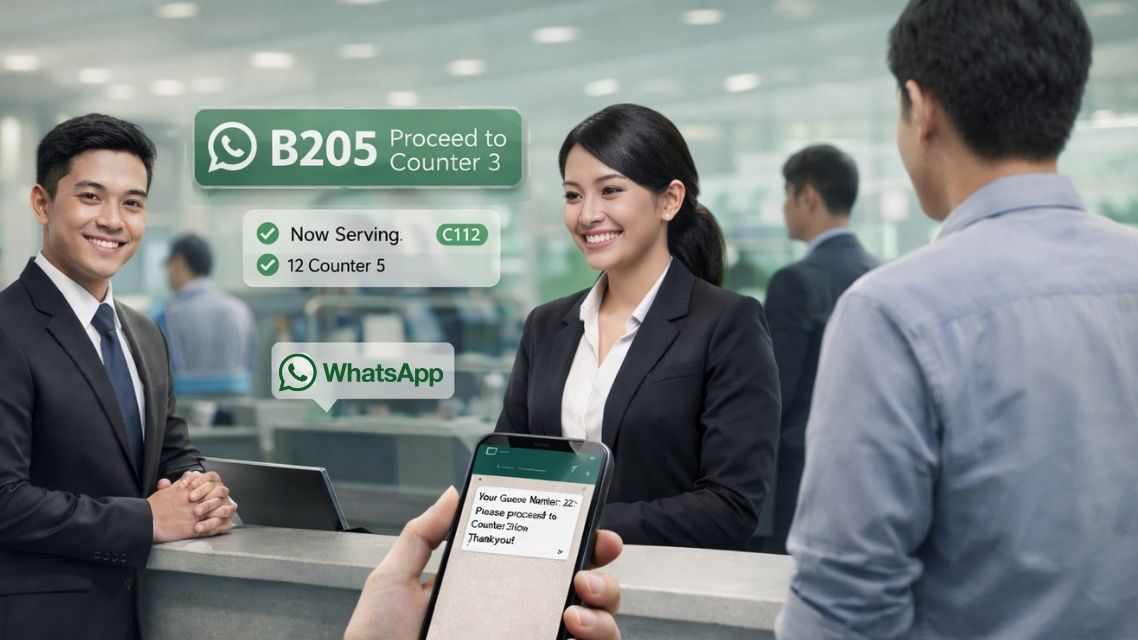
WhatsApp QMS
WhatsApp notification
WhatsApp QMS - Customer receives WhatsApp notification
Our Products

Two Products. One Powerful Portal.

Both Cloud QMS and WhatsApp QMS use the exact same web portal with identical features. The only difference is how customers are notified when their turn arrives.

Cloud QMS

Best for customers who wait on-site. Number shown on TV display with sound alert — no WhatsApp needed.

Cloud QMS Customer Queue Page
  • Customer scans QR code → joins queue via browser
  • Number called on TV display screen with sound alert
  • No WhatsApp or WABA registration needed
  • Lower monthly cost — no per-message charges
  • Works for customers without WhatsApp
  • Perfect for clinics, government offices, banks
  • Full admin portal — same as WhatsApp QMS
RM 599 setup + RM 200/month
No per-message fees · Cancel anytime

WhatsApp QMS

Best for customers who can wait anywhere. WhatsApp notification sent instantly when their turn arrives.

WhatsApp QMS Ticket Message
  • Customer scans QR code → WhatsApp ticket sent instantly
  • Customer notified via WhatsApp when turn is called
  • Customer can leave — wait in car, café, or home
  • Automatic recall via WhatsApp if they miss their turn
  • WABA registration required — our team handles setup
  • RM 0.16 per WhatsApp notification sent
  • Full admin portal — same as Cloud QMS
RM 599 setup + RM 100/month + RM 0.16/msg
WABA messaging fees apply per notification sent
Can't decide? Start with Cloud QMS and upgrade to WhatsApp QMS anytime — no data migration needed. Many businesses use both for different service types. Ask us which suits you →
How It Works

From QR Scan to Served

Both products follow the same simple flow — the only difference is step 3, how the customer is notified when their turn arrives.

Cloud QMS Flow
WhatsApp QMS Flow
1
📱

Scan QR Code

Customer scans QR code at your entrance with any smartphone — opens queue request page in browser instantly. No app download.

2
📋

Fill in & Join

Enter name, select service type, number of pax. Queue number assigned instantly. Takes under 30 seconds.

3
📺

Watch TV Display

Customer waits in the room watching the TV display screen. Sound alert plays when their number appears.

4
🖥

Staff Calls NEXT

Staff click NEXT in the web portal — display updates immediately with chime sound. Customer walks to counter.

Cloud QMS: Customer waits in the room and watches the TV display screen — no WhatsApp needed.
1
📱

Scan QR Code

Customer scans QR code at entrance — opens queue request page in WhatsApp or browser instantly.

2
📋

Fill in & Join

Enter name, phone number, service type. WhatsApp ticket sent automatically within seconds.

3
🚶

Wait Anywhere

Customer can wait in their car, a café, or nearby — they'll be notified on WhatsApp when it's their turn.

4
🔔

WhatsApp Alert

When staff press NEXT, a WhatsApp message with counter number is sent to the customer automatically.

5

Customer Arrives

Customer returns to counter when notified. Staff mark as served. Queue keeps moving efficiently.

WhatsApp QMS: Customer can leave and wait anywhere — notified via WhatsApp when their turn arrives.
Admin Portal

One Portal — All the Tools You Need

Both products use the identical web portal. Staff manage everything from a browser — no software installation, no IT support needed.

Queue Control
Dashboard
KPI Analytics
Queue Report
TV Display
History
Calendar
Feedback
Queue Control Panel

Queue Control Panel

The main screen for counter staff. One click calls the next customer — and automatically notifies them (via TV display or WhatsApp depending on your plan). Auto-refreshes every 12 seconds.

  • NEXTCall next customer + auto-notify via TV display or WhatsApp
  • SKIPMark absent customers as skipped — keeps queue moving
  • RECALLRe-notify a customer who missed their call
  • CUT Queue (Priority)Insert VIP or emergency customer to front instantly
  • Toggle Queue ON/OFFOpen or close any service type instantly — customers see change in real time
  • Custom Counter NamesRename counters from "Counter 1" to "Reception", "Cashier A" etc.
Admin Dashboard

Real-Time Dashboard

The first screen after login — today's entire queue picture at a glance. All stats update automatically without page refresh.

  • Total Requests Todayvs yesterday with % change indicator
  • Live Waiting & Serving CountReal-time counters per service type
  • 7-Day Trend ChartVisual queue volume trends for the past week
  • WABA Credit BalanceWhatsApp QMS only — today's usage vs remaining balance
  • Service Type BreakdownDonut chart showing volume per queue type
KPI Analytics

KPI Analytics — 8 Report Sections

Management-grade reporting to optimise staffing, identify peak hours, and measure performance. Export any report as CSV.

  • Average Wait TimeColour-coded: green (excellent) · amber (acceptable) · red (too slow)
  • Peak Hour Bar ChartKnow exactly when to add more counters or staff
  • Counter Performance Ranking🥇🥈🥉 medals — see your best-performing counters
  • Repeat Customer RateTrack returning customers and loyalty trends
  • WABA Cost AnalysisWhatsApp QMS: cost per served customer, Next vs Recall breakdown
Queue Report

Live Queue Number Report

Real-time status for every queue type simultaneously — your floor manager's best friend.

  • Current Queue NumberLatest ticket issued per service type
  • Currently Serving NumberWhich number each counter is serving right now
  • Today's Total Requests & PaxPeople served — not just ticket counts
  • Serve Rate %% of issued tickets successfully served today
TV Display

TV Queue Display Screen

Connect any Smart TV or monitor via browser — shows the currently-serving number in large text with sound alert and voice announcement. No additional hardware box needed.

  • Any Smart TV via BrowserJust open the display URL — no box or hardware required
  • Large Number DisplayQueue number readable from across the waiting room
  • Sound Alert + Voice TTS"Now serving 7002, please proceed to Reception" — auto-announced
  • Voice ON/OFF ToggleStaff can enable or disable voice announcement from the TV screen
  • YouTube Video BackgroundPlay promotional video while customers wait
Queue History

Queue Request History

Full searchable history of every queue request — filter by date, service type, status, and customer name or phone.

  • Date Range FilterToday, this week, this month, or custom range
  • Customer DatabaseName, phone, IC number, remark captured per request
  • Counter & Service DetailsSee exactly which counter served which customer
  • CSV ExportDownload any date range for follow-up marketing or records
Queue Calendar

Queue Calendar — Monthly Overview

See the full month at a glance — each day shows total requests, served count, pax, and avg wait time with a colour-coded dot. Click any day to drill into the full breakdown.

  • Monthly Calendar ViewGreen / amber / red dot per day based on serve rate
  • Day Detail PanelService type table, counter performance, hourly distribution
  • Month Summary TilesTotal requests, served, pax, active days, no-show rate
  • Export CSV & PDFDownload any single day's full report
Feedback Report

Customer Feedback & Ratings

After being served, customers receive a star rating prompt on their phone. Collect, analyse, and act on real customer sentiment — by service type, by counter, over time.

  • 1–5 Star RatingCustomer rates on their phone — one rating per queue ticket
  • Rating by Service & CounterSee which counters and service types score best and worst
  • Trend AnalysisDaily / weekly / monthly rating trends with satisfaction score
  • Keyword Word CloudMost common words from customer comments — at a glance
  • Optional FeatureEnable or disable per company — default OFF
Features

Everything Included

All features are included in both plans unless marked. No hidden costs, no feature gating by tier.

⬡ Both Plans
⬡ Both Plans

QR Code Queue Entry

Customers scan QR code with any phone — request page opens in browser. No app download, no account needed.

WhatsApp Notifications

Automated WhatsApp message sent to customer when called. Includes queue number, counter, and business name.

Cloud QMS highlight

TV Queue Display + Voice TTS

Smart TV display with large number, sound alert, and voice announcement — "Now serving 7002, please proceed to Reception."

⬡ Both Plans

Queue Push Feature

Transfer customers between departments or counters without issuing a new ticket — same number, new counter.

⬡ Both Plans

KPI Analytics (8 Sections)

Peak hours, counter rankings, avg wait time, serve rate, repeat customer rate. CSV export on every section.

⬡ Both Plans

Role-Based Staff Access

Unlimited staff accounts with Admin and Employee permission levels — each role sees only what they need.

⬡ Both Plans

Daily Ticket Limit

Set maximum tickets per queue type per day. Custom closed message shown to customers when limit is reached.

⬡ Both Plans

Customer Database

Every queue request captures name, contact, IC, and remark automatically. Exportable as CSV for follow-up marketing.

⬡ Both Plans

Secure & Audit Logged

Two-factor login, complete admin audit trail, CAPTCHA anti-spam on queue form. All actions timestamped.

⬡ Both Plans

IC / Passport Collection

Optionally collect IC or passport number on the queue request form — useful for clinics and government agencies.

⬡ Both Plans

Custom Counter Names

Rename counters to meaningful names like "Reception", "Cashier A", or "Dr. Ahmad" — shown across all screens.

⬡ Both Plans

100% Cloud Hosted

No local server, no hardware to maintain. Manage from any browser, from anywhere in the world. Always online.

⬡ Both Plans

Customer Feedback & Ratings

After being served, customers receive a 1–5 star rating prompt on their phone. View results by service type and counter with trend analysis. Optional — default OFF.

⬡ Both Plans

Customer Database

Every queue request builds a searchable customer database — name, phone, IC, visit count, repeat rate, and services used. Export CSV for marketing follow-up.

⬡ Both Plans

Staff Session Log

Track when each staff member is active at their counter — login time, queues handled, and session duration. Accountability reporting for management.

Business Benefits

Real Results for Malaysian Businesses

Measurable improvements to your operations — not just technology for its own sake.

Eliminate Physical Crowding

Customers wait comfortably — in their seat, car, or nearby café. No more packed waiting rooms or standing queues at your entrance.

70%
reduction in perceived waiting time

Automatic Customer Database

Every queue request captures name, phone number, and service preference automatically — zero manual data entry needed.

100%
customer contact capture rate

Data-Driven Operations

Know your peak hours, best counters, and average wait times. Make staffing decisions based on real data — not guesswork.

8
KPI report sections with CSV export

Higher Customer Satisfaction

Customers who know their place in queue are calmer, happier, and more satisfied — even if the actual wait time is the same.

49%
average increase in satisfaction scores

Staff Serve More Efficiently

No crowd management, no shouting numbers, no confused customers. Staff focus 100% on serving — throughput improves naturally.

30%
more customers served per day on average

Zero Hardware, Zero IT

100% cloud-based. No servers to maintain, no hardware to break, no IT department needed. Setup in under 24 hours from payment.

RM 0
hardware investment required
Industries

Any Business With a Waiting Area

Trusted by organisations across every sector in Malaysia — from private clinics to government offices.

🏥

Clinics & Hospitals

Patient flow with IC collection, multi-department push, and recall for missed patients

🏛

Government Offices

JPN, Pejabat Agama, Mahkamah, JPJ, LHDN, Jabatan Imigresen counters

🏦

Banks & Finance

Multi-counter management with priority queuing for premium and VIP clients

🎓

Universities & Schools

Student affairs, exam registration, administrative counters and faculty offices

🏪

Retail & Telco

Service centres, product counters, after-sales support, and walk-in queues

🚗

Automotive

Car workshops, driving schools, JPJ inspection, Puspakom, and service centres

🦷

Dental & Specialist

Appointment + walk-in queuing with recall and priority for emergency cases

🏢

Corporate & HR

HR departments, visitor management, reception and interview queuing

Pricing

Simple, Transparent Pricing

No hidden costs. No long-term lock-in. Choose the plan that fits your notification needs — upgrade or downgrade anytime.

 Cloud QMS
RM599
One-time setup fee · Includes full setup & training
RM 200 / month Unlimited queue tickets · Full portal access
• No WhatsApp message charges
• No WABA registration needed
• Lower total monthly cost
• 30-day satisfaction guarantee
• Cancel anytime with 30 days notice
  • Unlimited queue tickets daily
  • TV display screen with Voice TTS
  • KPI analytics — 8 sections
  • Unlimited staff accounts
  • Customer database & CSV export
  • Custom counter names
  • Complete audit log
  • 7+ years Malaysian support
Get Cloud QMS Demo
💡 Upgrade anytime: Start with Cloud QMS — add WhatsApp notifications later by upgrading to WhatsApp QMS. No data migration, no downtime, same portal.
Getting Started

Up and Running in Less Than 24 Hours

No hardware to install, no IT team needed. Our local Malaysian team handles the entire setup for you.

1

Contact Us & Choose Your Plan

WhatsApp or call us to discuss your requirements. We'll recommend whether Cloud QMS or WhatsApp QMS better suits your business — and give you a free demo first.

2

System Setup & Staff Training

We configure your entire system — queue types, counters, operating hours, staff accounts, and branding. Staff training included so your team is confident from day one.

3

Print QR Code & Go Live

Download your unique QR code, print at A4 size and display at your entrance. Open the web portal in any browser — and you're live. Total setup time: under 24 hours.

FAQ

Frequently Asked Questions

What is the difference between Cloud QMS and WhatsApp QMS?
Both use the exact same web portal with identical features. The only difference is how customers are notified when their turn arrives. Cloud QMS shows the number on a TV display screen with sound alert — the customer waits in the room. WhatsApp QMS sends an automated WhatsApp message to the customer's phone — the customer can wait anywhere. If your customers wait on-site, Cloud QMS is sufficient and more cost-effective. If they need to wait off-site (in their car, a café etc.), choose WhatsApp QMS.
Can I use both Cloud QMS and WhatsApp QMS together?
Yes — many businesses use Cloud QMS for walk-in customers who wait in the room, and WhatsApp QMS for online appointment customers who prefer to wait off-site. Both products can coexist on the same portal. Contact us to discuss a combined setup.
Do customers need to download an app?
No app download is required for either product. Customers simply scan the QR code with their phone camera — the queue request page opens in their mobile browser instantly. For WhatsApp QMS, they need WhatsApp installed on their phone to receive notifications.
Can I upgrade from Cloud QMS to WhatsApp QMS later?
Yes — easily. Since both products use the same portal, upgrading just means connecting your WhatsApp Business API (WABA) account. All your queue types, staff accounts, historical data, and counter names remain intact. No migration, no downtime.
How many counters and queue types can I have?
Unlimited. Create as many service counters, queue types, and staff accounts as your business needs — all included in the monthly subscription at no extra charge.
What does "RM 0.16 per WhatsApp message" mean for WhatsApp QMS?
Every time staff press NEXT to call a customer, one WhatsApp message is sent to that customer's phone — this costs RM 0.16 per message sent. If you serve 100 customers per day, the WhatsApp notification cost is approximately RM 16/day. The RM 100/month subscription covers everything else — unlimited queue tickets, portal access, analytics, and support.
Does Cloud QMS require internet?
Yes — Cloud QMS requires internet at your premises as it is cloud-hosted. Your customer's phone needs internet to scan the QR code and join the queue. Staff need internet to access the web portal. If you require an offline/LAN-based solution, please look at our Local Web QMS instead.
How long does setup take?
For Cloud QMS, setup is typically completed within 24 hours of payment — sometimes the same day. For WhatsApp QMS, setup takes 2–5 business days as WhatsApp Business API registration and message template approval is required. Our team handles the entire process — you just provide the required information.
Get in Touch

Talk to Our Team

We're a Malaysian team with 7+ years experience in queue management systems. Whether you need help choosing a plan, a live demo, or a custom quote — just reach out. We respond fast.

Operating hours: Monday – Friday, 9 AM – 6 PM · Emergency support available

Tell Us What You Need

Choose your interest and we'll reach out with the right information.

I'm interested in:

Cloud QMS

RM 200/month · TV display

WhatsApp QMS

RM 100/month + RM 0.16/msg

Both Products

Discuss combined setup

Not Sure Yet

Help me choose
Chat With Us on WhatsApp

No commitment · Free consultation · Local Malaysian team

Start Your Free Demo Today

Experience the full Cloud QMS system live — scan a real QR code, join a real queue, see the TV display update in real time. No sign-up, no commitment.