Malaysia's #1 WhatsApp Queue System

Let Customers Queue via
WhatsApp — From Anywhere

Customers scan your QR code, receive an instant WhatsApp queue ticket, and wait comfortably anywhere — no crowding, no app download, no frustration. Your staff manage everything from a powerful web portal.

No app download needed
Setup in 24 hours
500+ businesses in Malaysia
500+
Businesses Served
70%
Wait Time Reduced
0
App Download Needed
7+
Years Local Support
Live Queue Active
WhatsApp Queue Management System Malaysia — Admin Portal
WhatsApp notification sent ✓
Simple Process

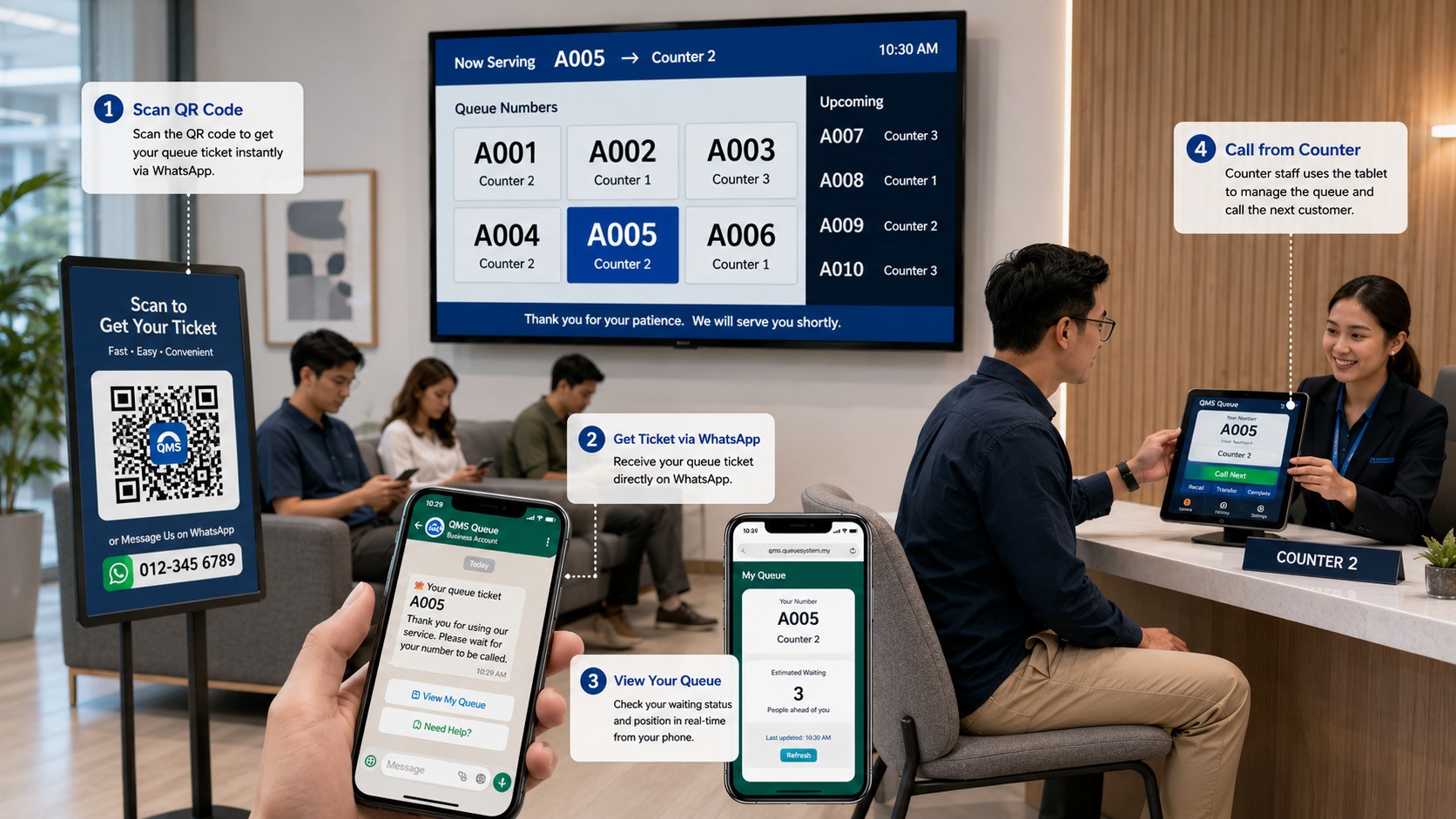
How WhatsApp Queue Works — 4 Simple Steps

From QR code to served customer — fully automated, zero paper tickets, works on any smartphone.

1
📱

Customer Scans QR Code

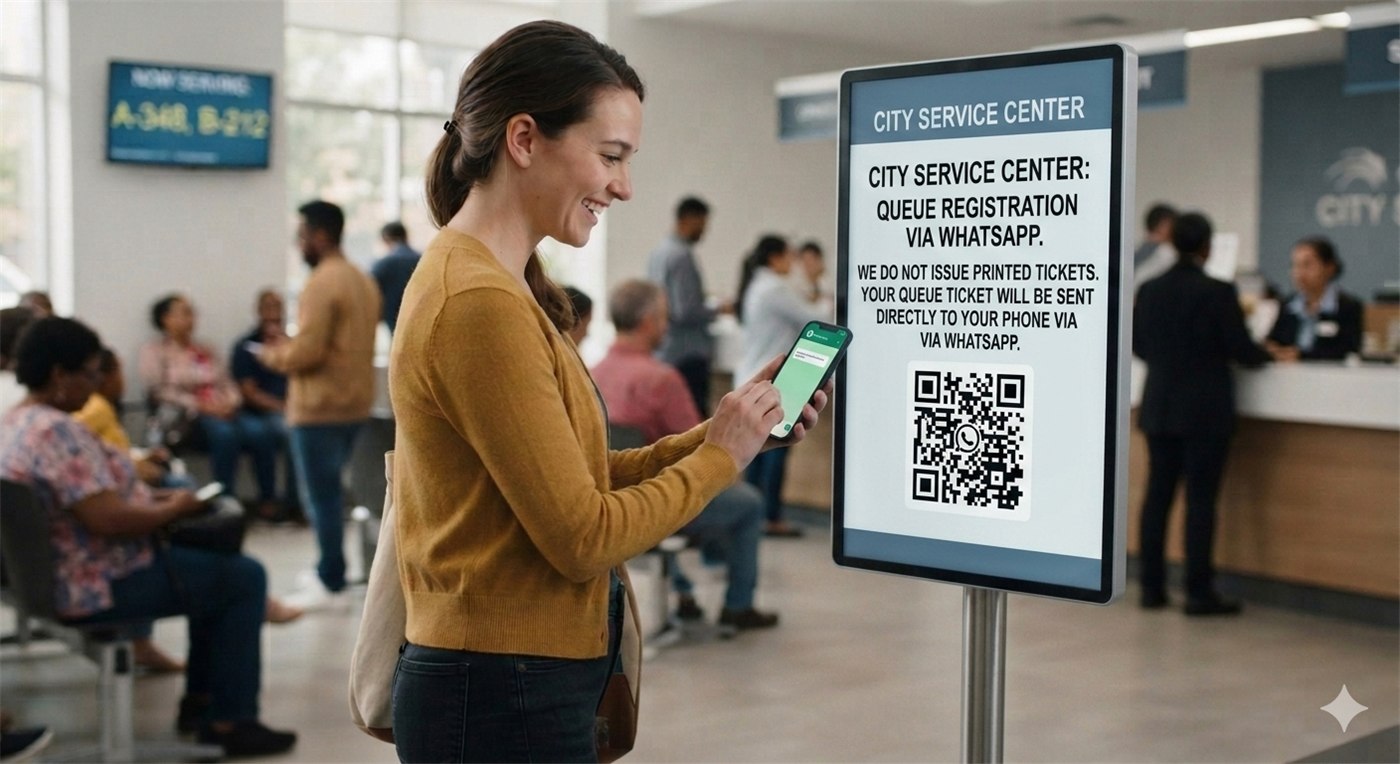
Scan your unique QR code with any phone camera — no app download, no account registration needed.

2
📋

Fill in Service Request

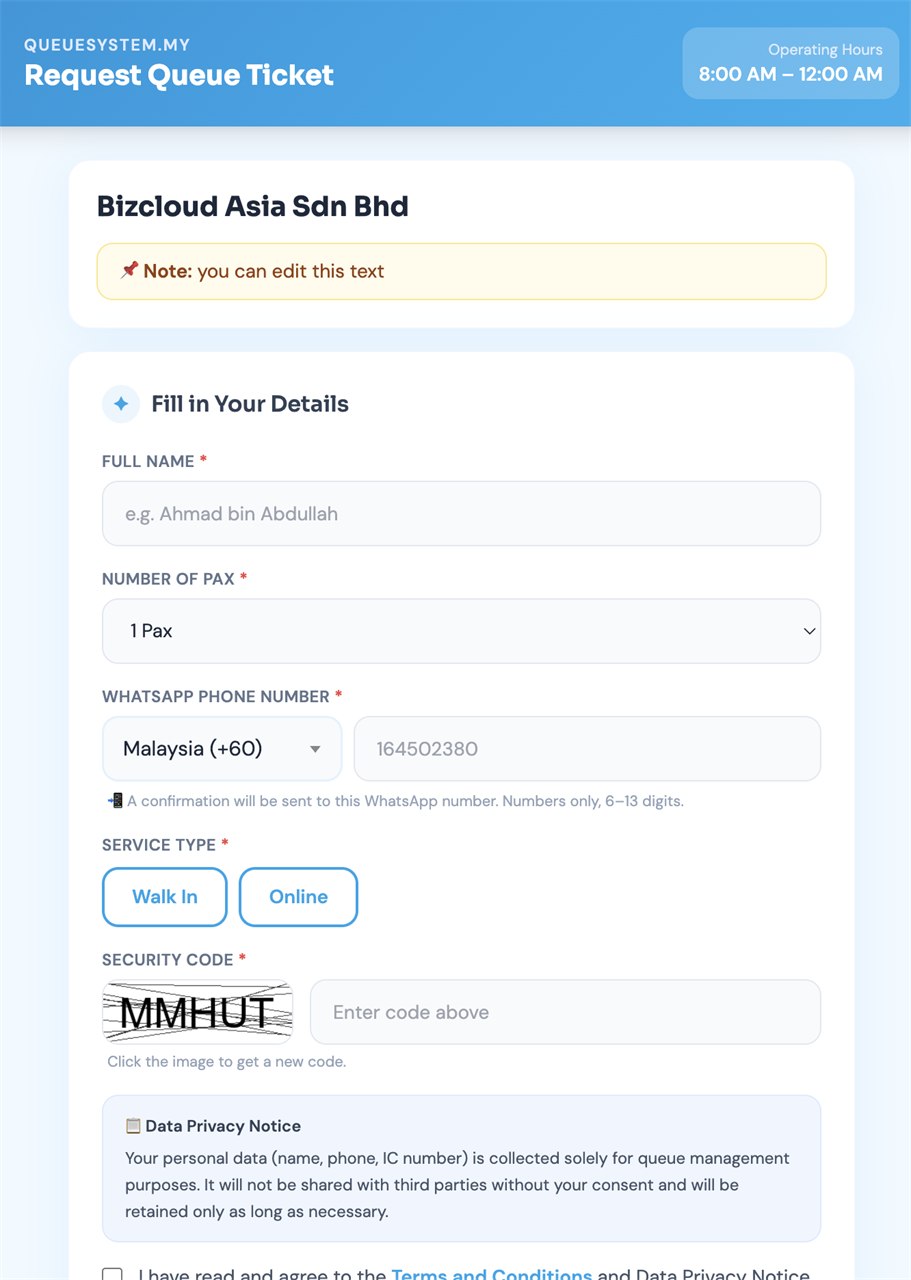
Enter name, phone number, number of pax, and select service type. Takes under 30 seconds on any smartphone.

3
💬

Receive WhatsApp Ticket

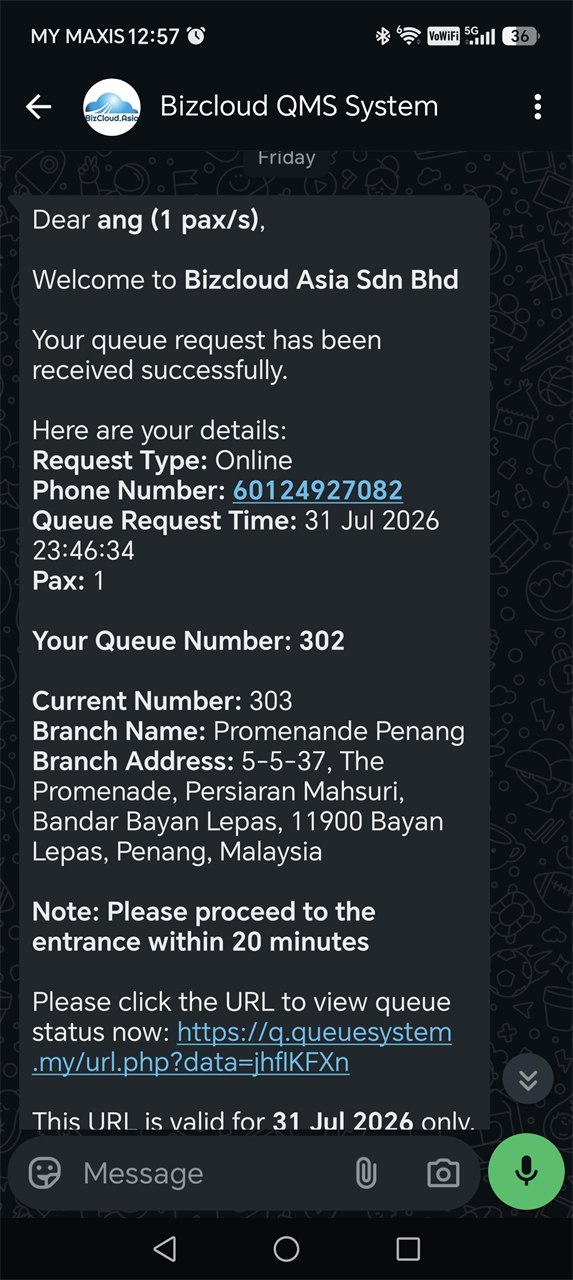
Instant WhatsApp message with queue number, current wait, and estimated time. Customer can wait anywhere.

4
🔔

Get Called via WhatsApp

Staff press NEXT — customer receives WhatsApp alert with counter number. No physical waiting in line.

What Each Step Looks Like — Real System Screenshots

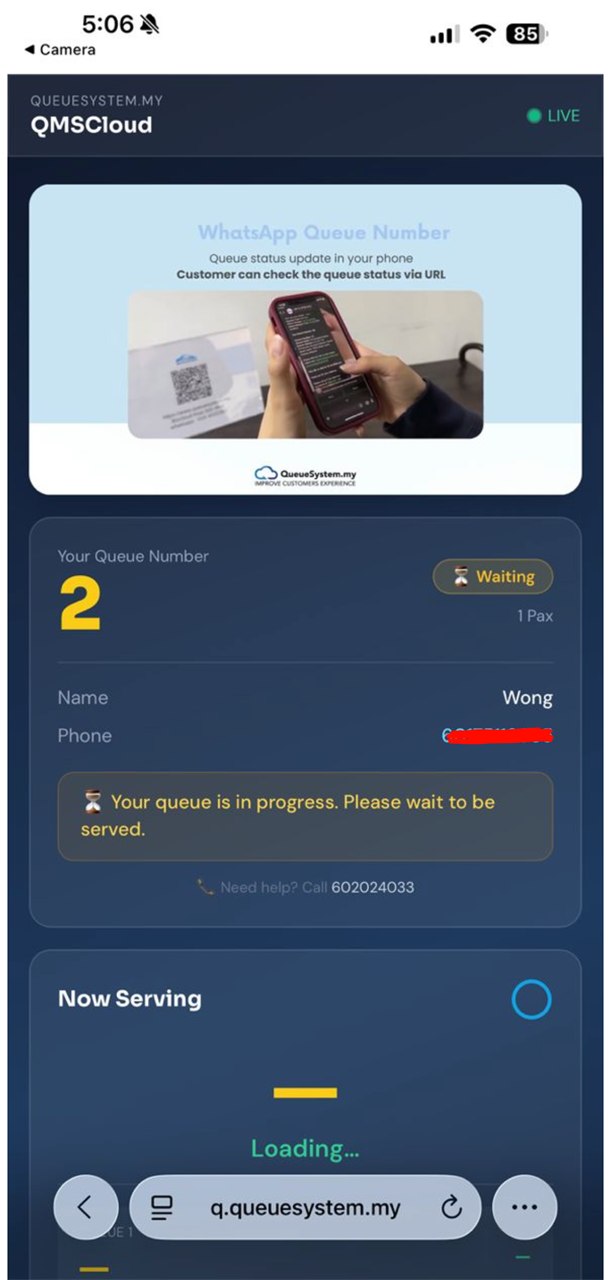
Customer QR Code Queue Request Page
Customer QR Page

QR Code Request Page

Customer opens this page after scanning QR. Selects service type, enters contact info.

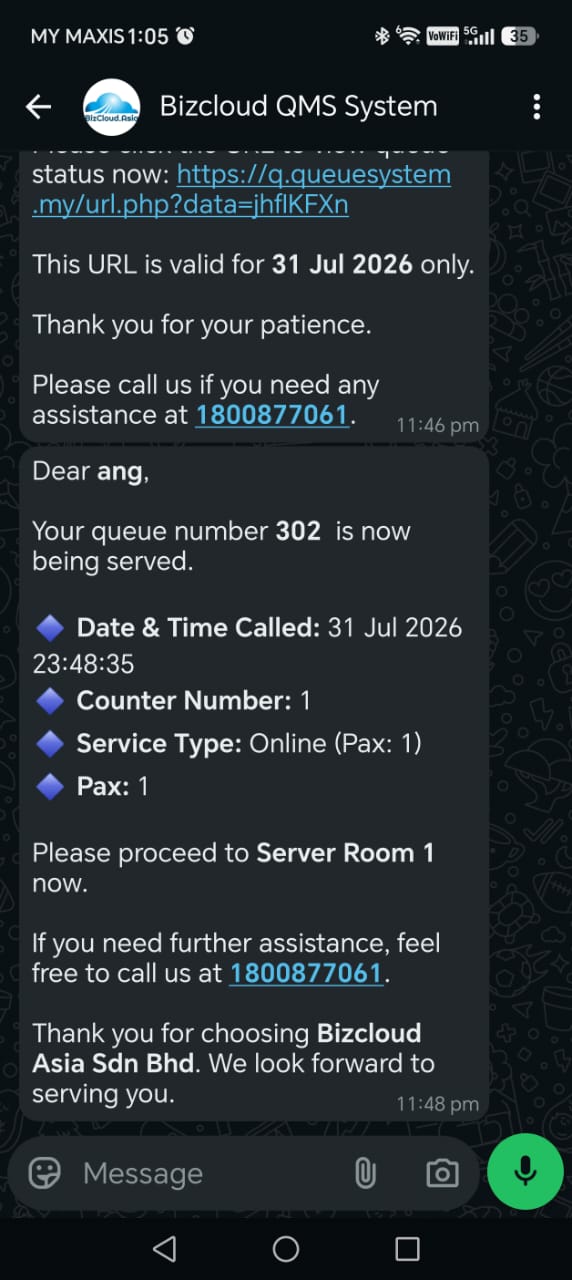
WhatsApp Queue Ticket Message
WhatsApp Ticket

WhatsApp Queue Ticket

Customer receives queue number, current serving, and estimated wait via WhatsApp instantly.

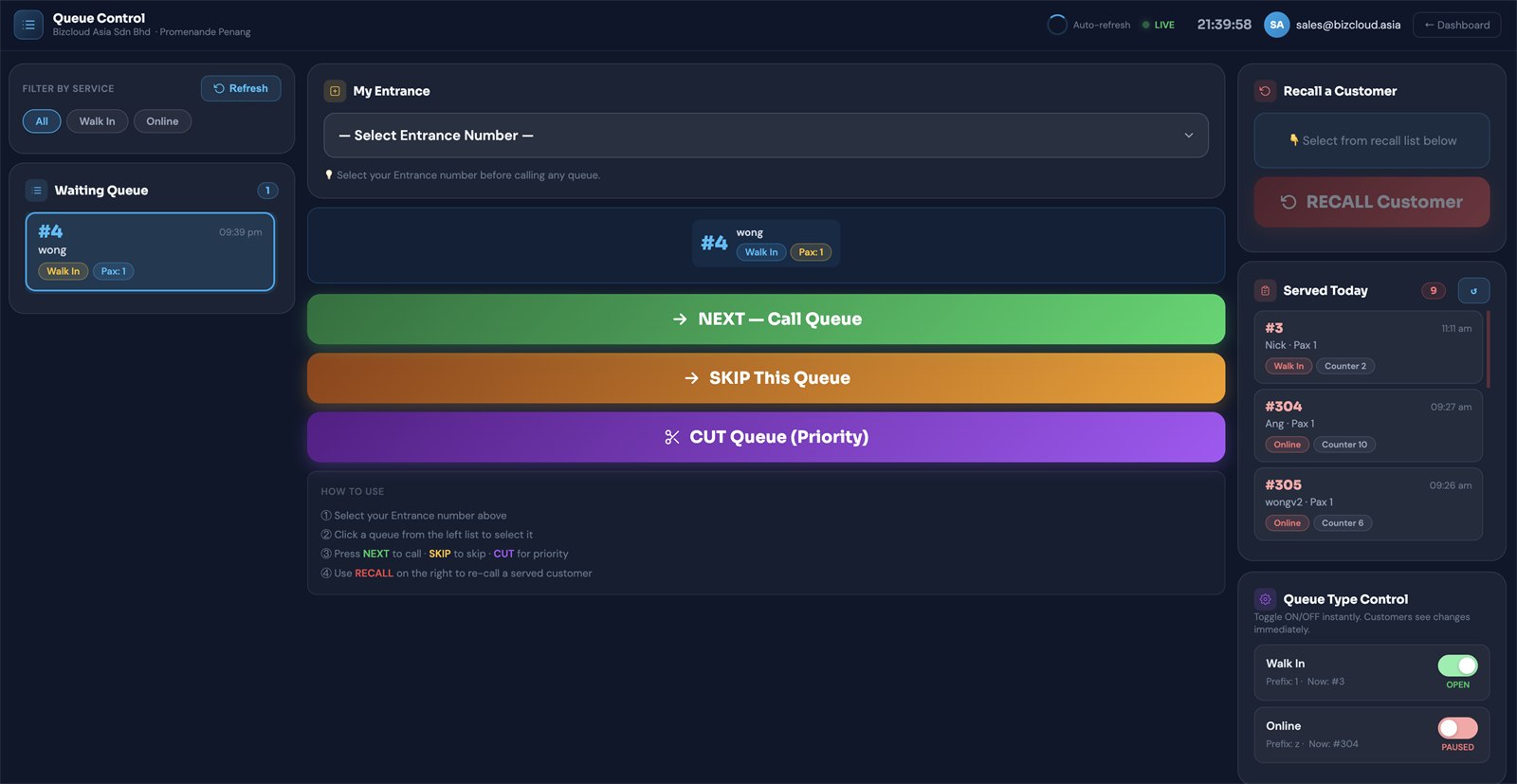
Admin Queue Control Panel
Admin Control Panel

Staff Queue Control

Staff press NEXT to call customer. WhatsApp notification sent automatically with counter number.

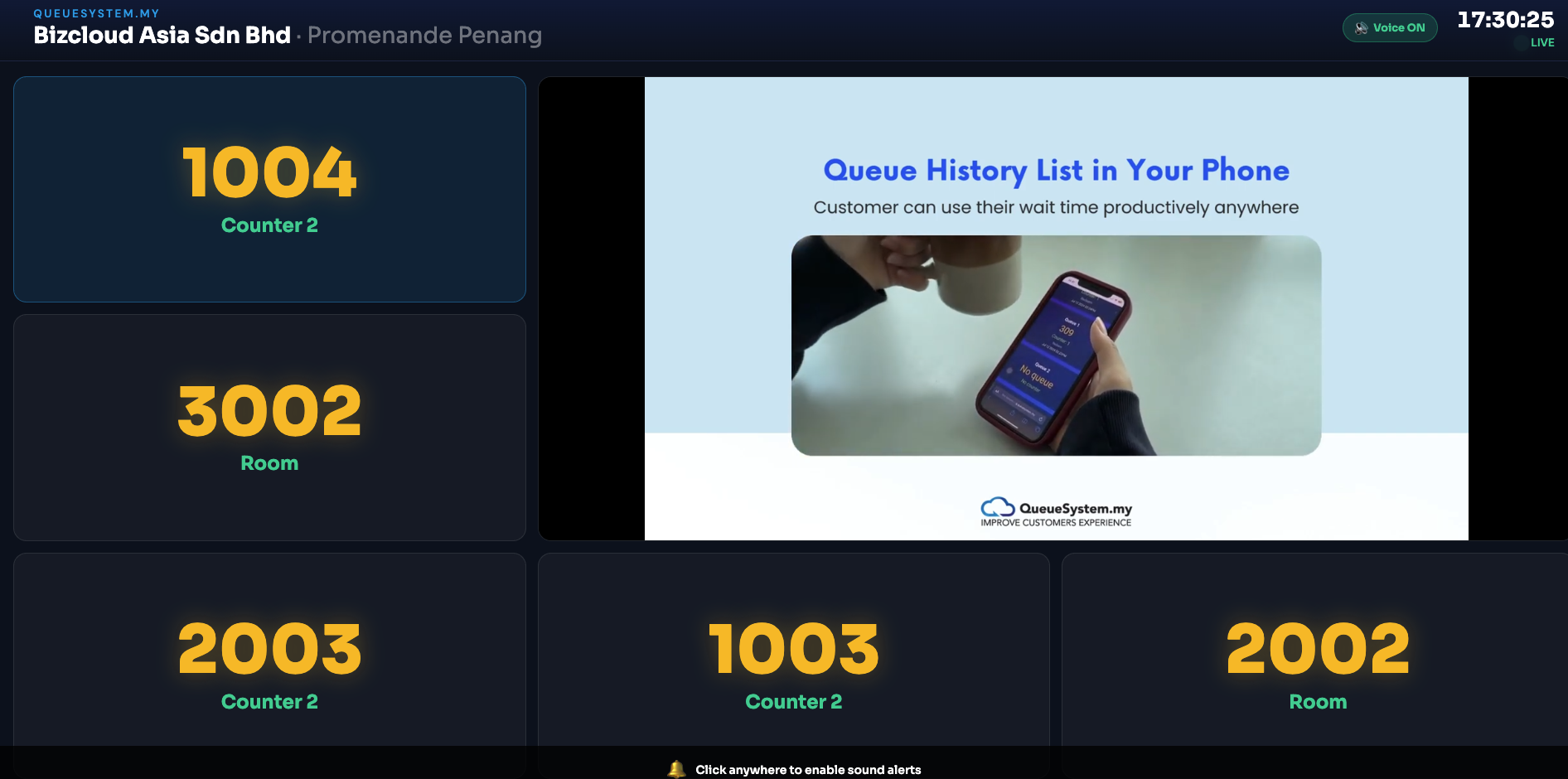
Queue Display TV Screen
TV Display Screen

TV Queue Display

Optional TV display shows currently-serving number — visible to all customers in waiting area.

Customer Queue Request Page
QR Scan Page
WhatsApp Queue Ticket
WhatsApp Ticket
WhatsApp Calling Notification
Calling Alert
Customer Experience

The Entire Journey Happens on WhatsApp — No Extra App

Your customers already have WhatsApp. That's all they need. From ticket to notification to being called — everything is delivered through the app they use every day.

Scan QR → Open Queue Page

Phone camera opens the queue request page directly — no download, no login, no friction.

Select Service → Enter Details

Choose service type, enter name + phone number. The system registers their position in queue immediately.

Receive WhatsApp Ticket Instantly

Queue number, current serving number, estimated wait time — all in one WhatsApp message. They can leave and come back.

WhatsApp Alert When Called

The moment staff press NEXT, an automatic WhatsApp message tells the customer their counter number. No crowding at all.

Admin Web Portal

Your Complete Queue Control Centre

Manage everything from any browser — desktop, tablet, or mobile. No software installation. Access from anywhere.

Queue Control Panel

Queue Control Panel

The main screen for counter staff. One click calls the next customer and sends their WhatsApp notification automatically. Auto-refreshes every 12 seconds.

  • NEXTCall next customer + auto-send WhatsApp with counter number
  • SKIPMark absent customers as skipped — keeps queue moving
  • RECALLRe-send WhatsApp to a customer who missed their call
  • CUTPriority serving — insert VIP customer to front of queue
  • PUSHTransfer customer to another department — same ticket number
  • Toggle Queue ON/OFFOpen or close any service type instantly
Admin Dashboard

Real-Time Dashboard

The first screen after login. See today's entire queue picture at a glance — live stats, trend charts, WABA credit balance, all updating automatically.

  • WABA Credit BalanceToday's WhatsApp usage vs balance — never run out unexpectedly
  • Total Requests Todayvs yesterday with % change indicator
  • Live Waiting & Serving CountReal-time counters per service type
  • 7-Day Trend ChartVisual queue volume trends for the past week
  • Service Type BreakdownDonut chart showing volume per queue type
KPI Analytics Dashboard

KPI Analytics — 7 Report Sections

Management-grade data to optimise staffing, identify peak hours, and justify performance decisions. Export any report as CSV.

  • Average Wait TimeColour-coded: green (fast) · amber (acceptable) · red (too slow)
  • Peak Hour Bar ChartKnow exactly when to add more staff
  • Counter Performance Ranking🥇🥈🥉 medals — see your best performing counters
  • Serve Rate %Served vs skipped — track no-show patterns
  • WABA Cost per CustomerMeasure cost efficiency per served customer
Queue Number Report

Live Queue Number Report

Real-time status for every queue type — your floor manager's best friend. See exactly what's happening at every counter simultaneously.

  • Current Queue NumberLatest number issued for each service type
  • Currently ServingWhich number each counter is currently serving
  • Today's Total RequestsRunning total of queue requests per service type
  • Total Pax CountNumber of people (not just tickets) served today
  • Serve Rate% of issued tickets that were successfully served
TV Queue Display Screen

TV Queue Display Screen

Optional but recommended — connect any TV or monitor via browser. Shows currently-serving number in large text with a sound alert. No additional hardware box needed.

  • Any Smart TV or MonitorJust open the display URL in the TV browser — no hardware needed
  • Large Readable DisplayQueue number readable from across the waiting room
  • Sound AlertAudio chime every time a new number is called
  • Auto-RefreshUpdates the instant staff call the next number — zero delay
  • Custom BackgroundsAdd company logo, brand colours, or promotional content
Business Benefits

Why 500+ Malaysian Businesses Choose WhatsApp QMS

Real, measurable improvements to your business — not just technology for its own sake.

Zero Crowding at Counter

Customers wait anywhere — in their car, at a nearby café, or at home. Physical crowding in your waiting area is completely eliminated.

70%
reduction in perceived wait time

Automatic Customer Database

Every queue request captures name, phone number, and service preference automatically — ready for follow-up marketing and re-engagement.

100%
contact capture rate (vs 0% with paper)

Data-Driven Operations

Know your peak hours, best-performing counters, and average wait times — make staffing decisions based on real data, not guesswork.

7
KPI report sections with CSV export

Higher Customer Satisfaction

Customers who can wait comfortably are calmer, happier, and more satisfied with your service — even if the actual wait time is the same.

49%
average increase in satisfaction scores

Staff Work More Efficiently

No crowd management, no shouting numbers, no confused customers. Staff focus 100% on serving — productivity improves naturally.

30%
more customers served per day (avg)

No Hardware Required

100% cloud-based. No servers to maintain, no hardware to break, no IT department needed. Setup takes less than 24 hours from payment.

RM 0
hardware investment required
Industries

Any Business With a Waiting Room

Trusted by organisations across every sector in Malaysia — from clinics to courts.

🏥

Clinics & Hospitals

Patient flow with IC/passport collection, multi-department push

🏛

Government Offices

JPN, Pejabat Agama, Mahkamah, JPJ, LHDN counters

🏦

Banks & Finance

Multi-counter management with priority queuing for premium clients

🎓

Universities

Student affairs, exam registration, administrative counters

🏪

Retail & Telco

Service centres, product counters, after-sales queues

🚗

Auto Service

Car workshops, driving schools, JPJ inspection centres

🦷

Dental Clinics

Appointment + walk-in queuing with recall functionality

🏢

Corporate Offices

HR departments, visitor management, reception queues

Getting Started

Up and Running in Less Than 24 Hours

No hardware to install, no IT team needed. Our local team handles the entire setup for you.

WhatsApp Business API Number
A dedicated phone number registered as WhatsApp Business API (WABA). Our team guides you through registration, business verification, and message template approval — usually 1–3 business days.
System Setup & Configuration
We configure your entire system — queue types, service buttons, operating hours, staff accounts, and branding. Staff training included so your team is confident from day one.
Print QR Code & Go Live
Download your unique QR code, print it at A4 size and display at your entrance. Open the web portal on any browser — and you're live. Total setup time: under 2 hours.
Transparent Pricing

Simple, Affordable — No Hidden Costs

No long-term contract. No lock-in. Cancel anytime with 30 days notice.

One-Time Setup Fee
RM599
Includes full system setup, configuration & staff training
RM 100 / month Subscription — unlimited queue tickets, full portal access
+ RM 0.16 per WhatsApp message — charged based on actual usage only
  • WhatsApp message charge: RM 0.16 per message (charged separately)
  • Each customer interaction sends up to 3 messages (ticket, called, recall)
  • Volume discounts available for multiple locations
  • Annual subscription required — full 12-month payment must be made upfront
WhatsApp Message Cost Estimate
~RM 16
100 customers/day
~RM 48
300 customers/day
~RM 80
500 customers/day
Based on RM 0.16/msg × avg 1 msg per customer × 30 days
Get Free Demo & Quote
Everything Included
  • Unlimited queue tickets daily
  • Unlimited queue types & service counters
  • WhatsApp notification — on ticket, call & recall
  • Full admin web portal access
  • Real-time KPI analytics dashboard (7 sections)
  • Live Queue Number Report
  • Role-based staff accounts — unlimited
  • TV queue display screen
  • Customer database & CSV export
  • Daily limit & custom closed message
  • Complete audit log
  • 7+ years local Malaysian support
FAQ

Frequently Asked Questions

Does the customer need to download any app?
No. Customers just scan the QR code with their phone camera — the request page opens in the browser. The only app they need is WhatsApp, which virtually everyone in Malaysia already has.
What if the customer doesn't have WhatsApp?
The customer can still scan the QR code and join the queue. They just won't receive WhatsApp notifications. They can monitor their queue position via the display screen in your waiting area. However, WhatsApp penetration in Malaysia is above 95%, so this is rarely an issue.
How many counters and staff accounts can I have?
Unlimited. You can create as many service counters, queue types, and staff accounts as your business needs — all included in the RM 100/month subscription at no extra cost.
What is WABA and how much does it cost?
WABA stands for WhatsApp Business API — it's the technology that sends automated WhatsApp messages to your customers. We charge RM 0.16 per WhatsApp message sent. Each customer typically receives 1–3 messages (queue ticket confirmation, called notification, and recall if needed). Example: 100 customers/day ≈ RM 16/day in message costs (~RM 480/month), billed on top of the RM 100/month subscription.
Can I manage multiple branches from one portal?
Yes. The portal supports multi-branch management — each branch has its own QR code and queue settings, but management can view across all locations. Volume discounts are available for 3+ locations.
What happens if the internet goes down?
New customers won't be able to join the queue during the outage as the system requires internet. However, customers who are already in the queue retain their numbers. We recommend keeping a basic offline backup (like a simple numbering system) for critical environments.
How long does setup take?
The technical configuration takes 2–4 hours. WABA registration and approval by Meta takes 1–3 business days. From payment to going live is typically 1–3 business days depending on WABA approval speed.
Is there a contract or minimum subscription period?
No long-term contract. You pay month to month and can cancel with 30 days notice. The RM 599 setup fee is a one-time charge — your subscription is just RM 100/month after that.

Ready to Eliminate Queues with WhatsApp?

Join 500+ Malaysian businesses. Get a free live demo — we'll show you the full system on a video call or at your premises.

Free consultation  ·  No obligation  ·  Live in 24–72 hours