A valid scan, and the turnstile turns
The guest holds up the QR from their email. The device reads it, checks it belongs to this event, records the attendance online, and drives the door relay — all in the time it takes them to walk up to the barrier.
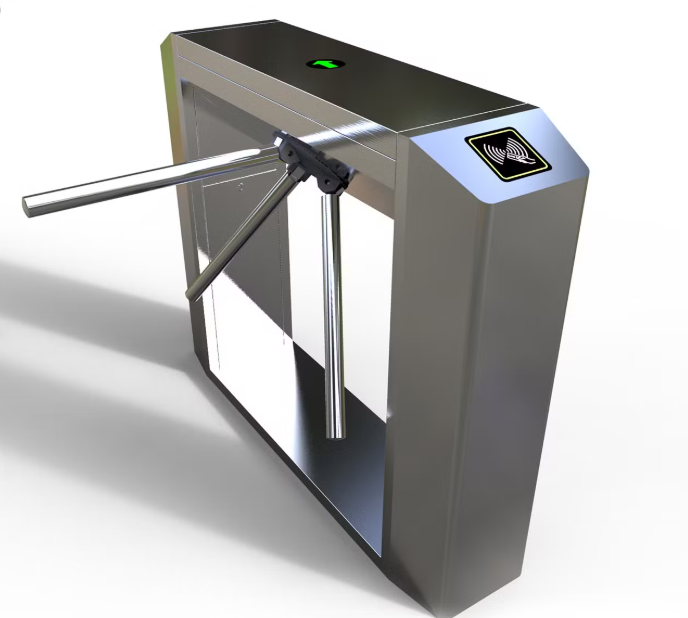
Four things, in about a second
Open a barrier, or just take the register
The same device does both. It's one setting, and it's worth deciding before the day rather than on it.
Controls the barrier
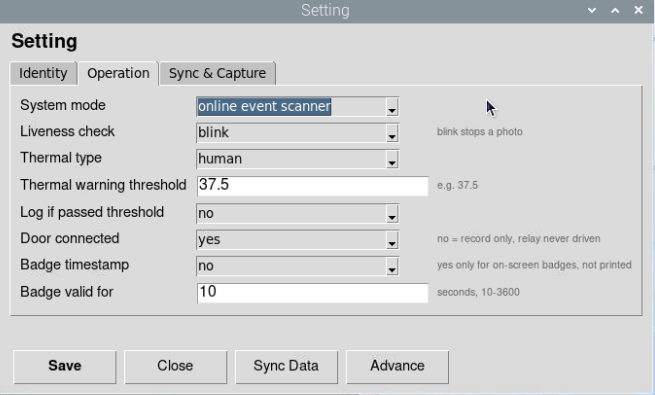
The device drives the relay, so a valid scan physically releases the tri-bar or door. Nobody gets past without a pass that checks out.
- Tri-bar turnstile or door release
- Entry is enforced, not just observed
- Frees your staff from checking passes by hand
- Right for ticketed or restricted events
Takes attendance, opens nothing
The relay is never driven — the device simply records who scanned. Useful at an open entrance where you want the register but not a barrier.
- Attendance recorded exactly the same way
- No turnstile or door hardware needed
- Good for open halls and free events
- Can be switched on later if you add a barrier
What else the device can insist on
Available on the BMO TF, and switched on only if your event needs them.
Liveness check
A blink is required, so holding up a photograph doesn't get anyone through.
Thermal screening
An optional temperature reading against a warning threshold, with the option to log or block.
Badge validity window
On-screen badges can be set to stay valid for a limited number of seconds rather than indefinitely.
All of it lives in one settings screen
Door connected, liveness, thermal type and threshold, and badge validity are all on the device's operation settings. We configure them with you when the scanner is installed, and they can be changed between events.
- One screen, no separate access-control system
- Changed per event if your needs differ
- Same device runs staff attendance afterwards
Do you need a barrier, or just the register?
Tell us about the entrance and we'll advise whether a turnstile is worth it, quote the hardware, and set it up.