Any tablet becomes a ticket station
No printer, no kiosk, no cabling. Log in to the BMO App on a tablet, stand it at the entrance or hold it at reception, and the customer taps the service they need to take a queue number — into the same numbering pool as every other ticket source.
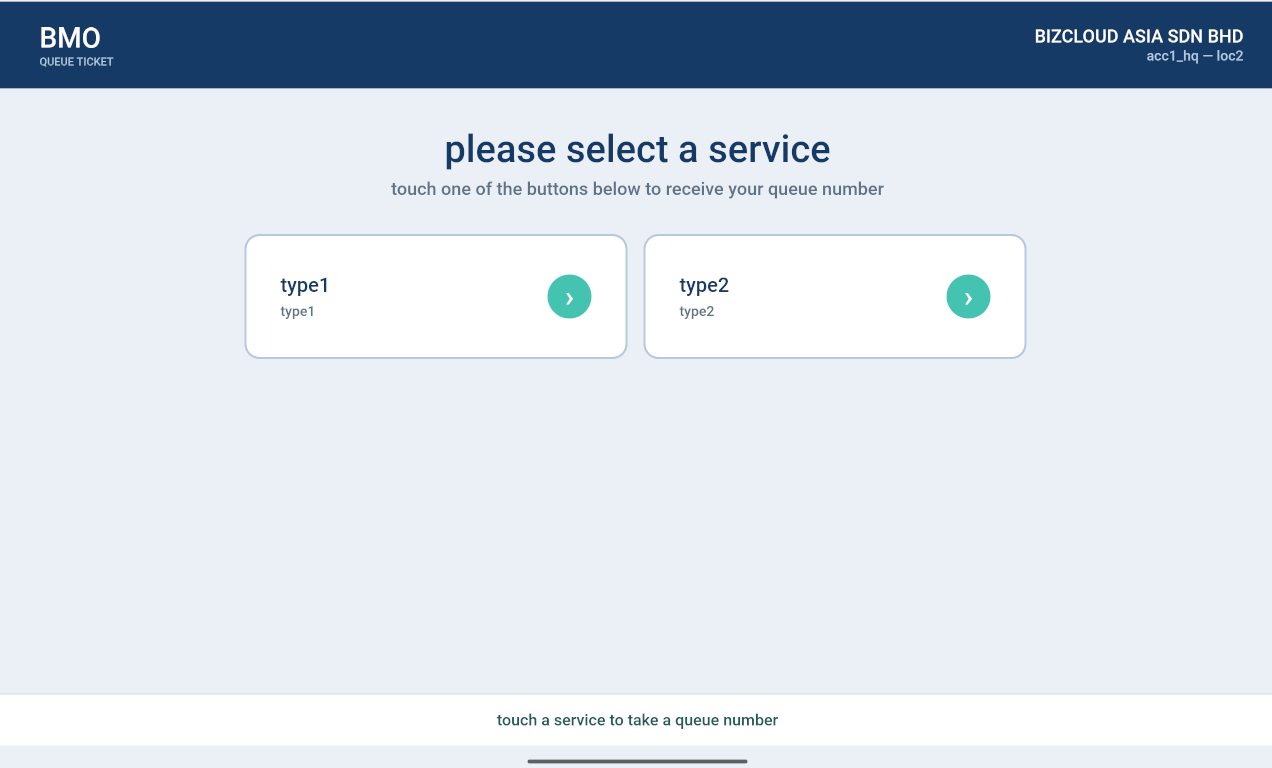
Three steps, and you're issuing numbers
Log in on the tablet
Open the BMO App and log in. The tablet identifies itself as a ticket station for your company and location — the header shows exactly which one, so nobody issues numbers at the wrong branch.
Customer taps a service
The screen shows one large button per service you offer. The customer touches the one they need. That's the whole interaction — no instructions, no keypad, no queue of people waiting to be greeted.
The number is issued
The queue number goes straight into the system, so it appears at the counters, on the TV display, and in your reports exactly as if it had come from a QTP or a kiosk.
Your services, and nothing else
The ticket screen is deliberately plain: your company name and location in the header, a clear instruction, and one button per service. A customer who has never seen it before still knows what to do.
- Company name and location shown in the header
- One large touch button per service type
- Prompt at the bottom in plain language
- Nothing else on screen to tap by mistake
Configured once, in the Queue Manager
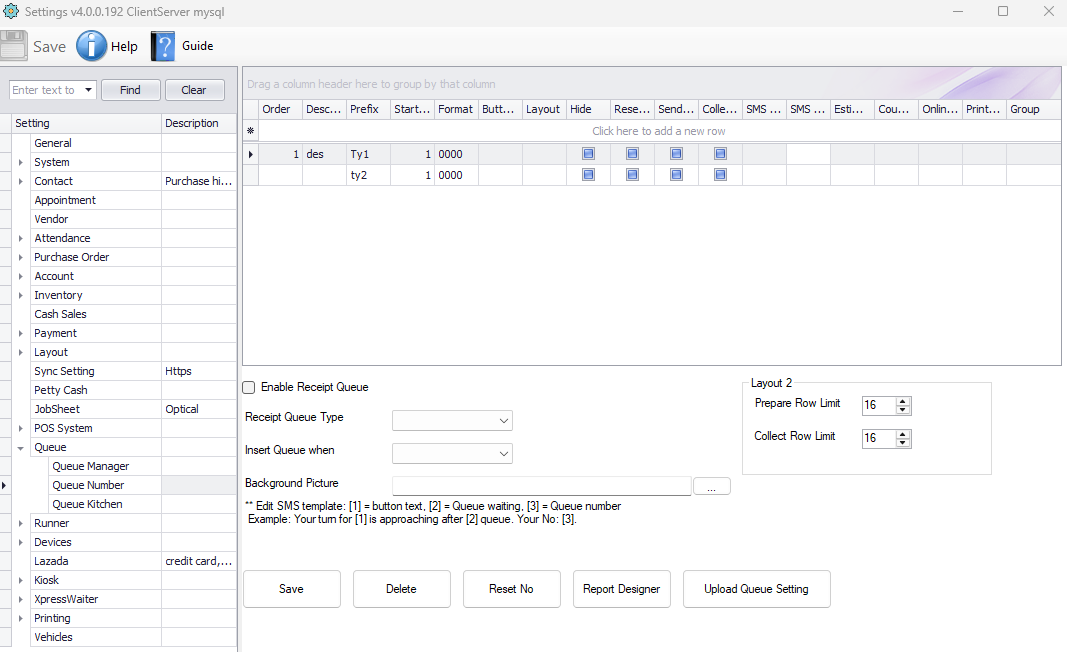
The services on that screen are not set on the tablet. They come from the ticket type settings in the Windows Queue Manager, alongside the daily number reset — so every ticket source in the building offers the same services and shares one numbering series.
- Ticket types configured in the Windows Queue Manager
- Change them once — every tablet, QTP and kiosk follows
- Numbering resets daily, set in the same place
- One shared pool, so numbers never collide
Four things, one of them non-negotiable
App-based ticketing is the cheapest way to start — as long as you have somewhere for the data to live.
An Android tablet
Nothing exotic. An affordable tablet on a stand at the entrance is enough.
The BMO App
Installed on the tablet and logged in to your company account and location.
A Queue Manager
Where the ticket types and daily reset are configured, and where counters call numbers.
A MySQL server
For app-based setups a MySQL server is required — it is not optional as it is on a Windows-only system.
On a Windows-only setup the Queue Manager can hold the database itself, so a separate server is optional. The moment tablets or the app are involved, a MySQL server becomes a requirement — it can sit on the same machine as the Queue Manager, or on its own WAMP box. See server setup →
Tablet, printer or kiosk?
All three feed the same queue. The difference is what your entrance looks like and whether the customer needs paper in their hand.
| BMO App on tablet | QTP-150 printer | Floor kiosk | |
|---|---|---|---|
| Prints a paper ticket | No — number shown on screen | Yes | Yes |
| Where it sits | Anywhere — movable | On the counter | Fixed in the lobby |
| Setup effort | Log in and go | Plug in, connect | Installed on site |
| Needs a MySQL server | Yes, required | No — can run standalone | Yes, via Queue Manager |
| Best for | Pop-ups, roaming staff, small lobbies | Single counters, small clinics | Busy public entrances |
| Starting price | Tablet + licence — ask us | RM 3,599 | RM 5,899 |
Start with a tablet, add hardware later
App-based ticketing is the quickest way to get a real queue running. When the door gets busier, add a QTP or a kiosk — the numbering carries on without a break.